



Free, open-source agents that use websites for you, and when a cheaper tool will do.
Last verified: 21 September 2026 · 20 minute read · Some comfort with a terminal helps
Who this guide is for
Anyone who wants an AI to use websites for them: fill forms, click through portals, collect information from pages with no API.
It covers the free, open-source browser agents. The paid, all-in-one products that also drive a browser (Grok Bot, Perplexity Computer, Manus, Claude) have their own guides.
By the end you'll know: the main projects, how to install the leading one, the single habit that stops browser agents looping, and when not to use a browser agent at all, which is most of the time.
In one sentence
A browser agent is an AI that operates a real web browser, seeing the page, clicking, typing and scrolling, so it can work on websites that were only ever built for humans.
The analogy that makes it click
Most software talks to other software through a back door called an API. Fast, reliable, cheap.
A browser agent uses the front door, the same as you. It opens the website, looks at it, and clicks. That means it can work on any site at all, including ones with no back door. It also means it's slow, expensive and easily confused, the same way a new temp would be on an unfamiliar website.
The rule this whole guide comes down to: only use the front door when there's no back door.
⚠️ First, check you need one at all
A community reply that saves a lot of money (1 vote, but correct):
"Exa, Parallel, Tavily are better than browser use" for finding information.
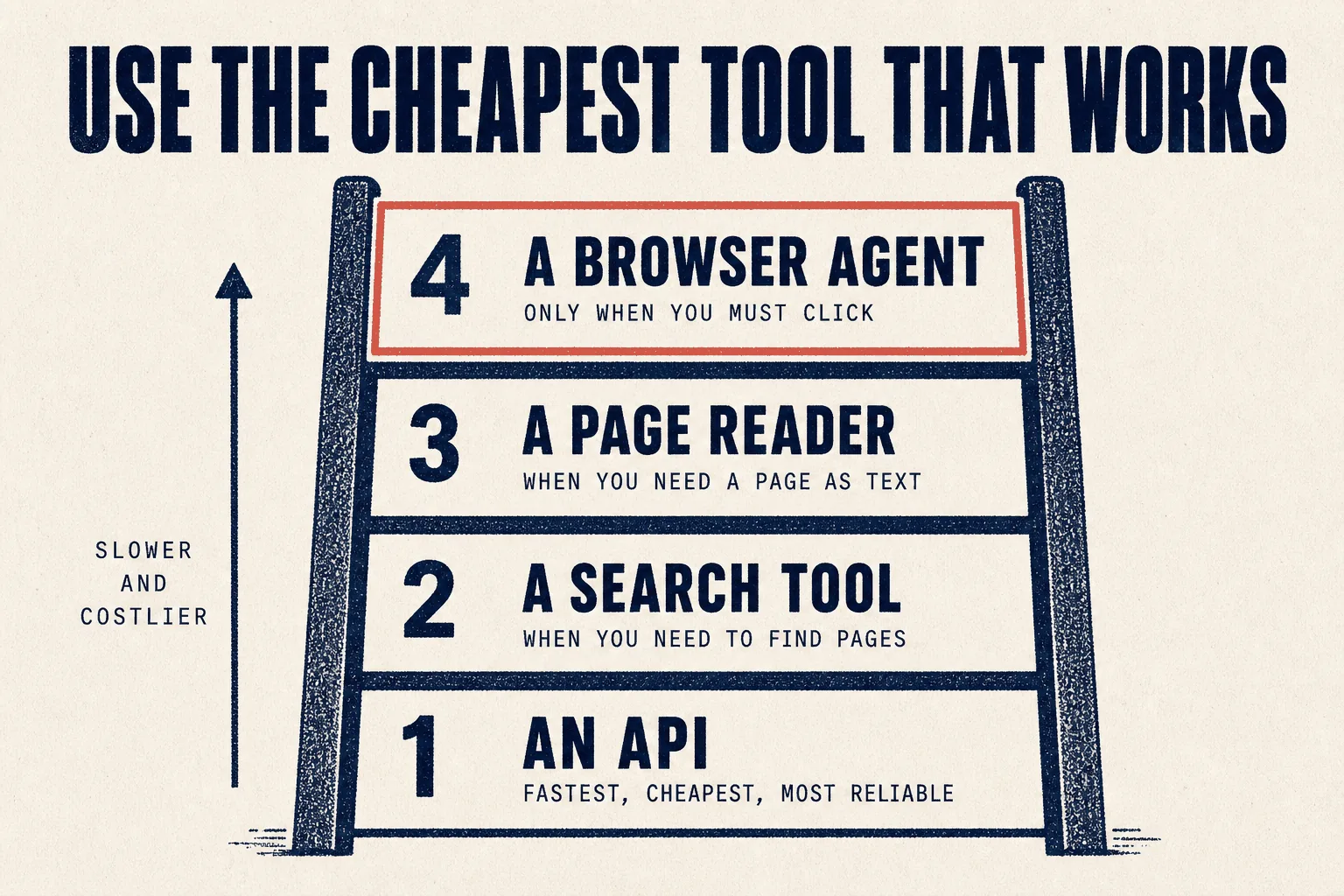
They're right for that job. Use the cheapest tool that does it:
| You need to | Use | Why |
|---|---|---|
| Get data a service offers officially | its API | fastest, cheapest, won't break |
| Find pages about something | a search API | returns results, not screenshots |
| Read a page as text | a page reader such as Jina Reader | one request, no browser |
| Click, log in, fill a form, work a portal | a browser agent | the only thing that can |
Browser agents earn their keep only in that last row.
The projects that matter
Star counts, licences and update dates verified against GitHub on 21 September 2026.
| Project | Stars | Language | Licence | What it is |
|---|---|---|---|---|
| browser-use | 115,718★ | Python | MIT | the category leader: an agent that navigates the web like a person |
| agent-browser | 42,984★ | Rust | Apache 2.0 | Vercel's browser tool for agents, known for using fewer tokens |
| OpenCLI | 29,524★ | JavaScript | Apache 2.0 | turns websites into command-line tools, using your logged-in browser |
| cua | 25,520★ | MIT | full computer use across operating systems, not only the browser | |
| nanobrowser | 13,818★ | TypeScript | Apache 2.0 | a Chrome extension that runs agents in your own browser |
| Agent-S | 12,335★ | Python | Apache 2.0 | a framework for agents that use a whole computer like a human |
| dev-browser | 6,631★ | TypeScript | MIT | a Claude skill that gives an agent a browser |
| BrowserSkill | 6,255★ | TypeScript | MIT | from Tencent: lets agents use your real, logged-in browser |
| Fara | 6,188★ | Python | MIT | Microsoft's own computer-use models |
⚠️ A category to avoid for client work
Some popular projects market themselves on evading detection: "stealth" browsers built to get past Cloudflare and anti-bot systems. Two examples with large followings are camofox-browser (11,134★) and AIHawk (31,614★), which describes itself as an "anti detect browser".
We don't recommend them for client work. Websites put those protections there on purpose. Getting around them usually breaks the site's terms, and for an agency that's how a client's account gets suspended after you've billed for the work.
browser-use in depth
It's the leader by a wide margin, so it gets the detail. Its own tagline: "Navigate the web like a human does."
Three ways to use it
| Route | For | Cost |
|---|---|---|
| 1. Hosted cloud | scaling up without running anything yourself | cloud browsers from $0.02 per browser-hour; new Google, GitHub or Microsoft sign-ups get $15 of credit |
| 2. A skill for your existing agent | giving Claude Code, Hermes or OpenClaw a browser | free, plus your model costs |
| 3. Python library | building it into your own code | free, plus your model costs |
From the browser-use README, 21 Sep 2026.
Route 2: add it to an agent you already use
The project's own instruction, which you paste into Claude Code, Codex, Hermes or OpenClaw:
Install or upgrade browser-use to the latest stable version with uv using
Python 3.12, run `browser-use skill install` to register the skill, and
connect it to my browser. If setup or connection fails, follow
https://github.com/browser-use/browser-harness/blob/main/install.md.
This is the easiest route for most readers of this library.
Route 3: the Python library
uv init --python 3.12        # new project only
uv add browser-use
Put your model key in a .env file:
OPENAI_API_KEY=your-key
Then a minimal agent, adapted from the README:
import asyncio
from browser_use import Agent, ChatOpenAI
from dotenv import load_dotenv

load_dotenv()

async def main():
    agent = Agent(
        task="Find the opening hours on example.com and report them",
        llm=ChatOpenAI(model="gpt-5.6-luna"),
    )
    await agent.run()

asyncio.run(main())
About the cloud features. The hosted service advertises stealth browsing, CAPTCHA solving and residential proxies, and the project's headline demo shows it "handle the CAPTCHA" while booking a test. Those are features, not a recommendation. On any site whose terms forbid automation, using them puts the account at risk. See the warning above.
⚠️ Why browser agents fail, and the one habit that fixes most of it
The honest state of the field, from people using these tools (23 votes):
"I gave my agent Ticketmaster for two GA tickets. Two clicks if I do it. 40 minutes later it's still stabbing at the seating map, and the cart expired twice. The second the site throws a CAPTCHA or some weird modal, it just loops. I watched it re-open the same popup 11 times."
From someone who spent two weeks on it (17 votes):
"Spent like two weeks watching browser-use hallucinate clicks on elements that didn't exist."
And the blunt summary (1 vote):
"Love how every browser automation framework ships with a demo video where the agent fills out one form on a static page, and they call it production-ready."
The fix
The most useful reply in the whole thread explained why the looping happens:
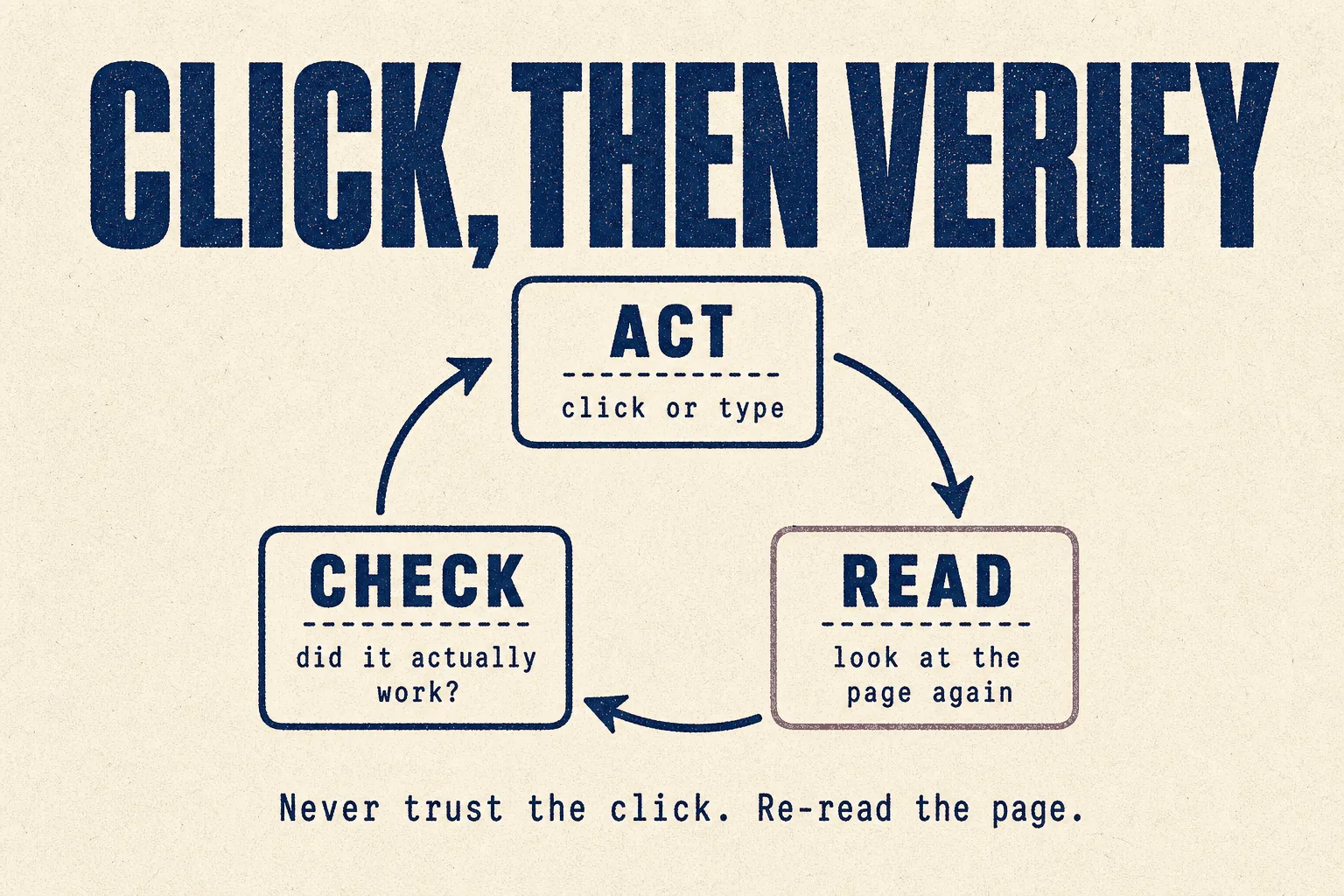
"The 11 repeats are the tell, and that's not a selector problem. It's an agent trusting the tool's return code instead of re-reading the page. Mine looped the same way until every write got a read after it: click, then verify."
Click, then verify. After every action, the agent must look at the page again and confirm the thing actually happened, rather than trusting that the click "succeeded".
Put it in your instructions:
After every click, form entry or navigation, re-read the page and confirm
the expected change happened before doing anything else. If it didn't,
stop and describe what you see. Never repeat the same action more than
twice. If a CAPTCHA or login challenge appears, stop and ask me.
Other fixes that helped people
- Find elements by their accessible label, not their visual position. One reply: detecting a popup "by aria label instead of CSS selector" is far more reliable when the page shifts.
- Avoid pages that change on every hover. "Seating maps are a special kind of hell for agents."
- Cap retries. Two attempts, then stop and report.
What people genuinely use them for
The jobs that worked, from a thread asking exactly that (31 votes):
| Job | Why it suits a browser agent |
|---|---|
| Scheduling 100 YouTube videos a day: syncing descriptions, uploading thumbnails, setting release dates | repetitive, same screens every time |
| Collecting insurance quotes from the top ten insurers | portals with no API |
| Finding new jobs matching a CV, posted in the last 24 hours | reading many pages, one structured output |
| Tracking payments from email into a shared spreadsheet | tedious and predictable |
The pattern: the same set of screens, many times over. Browser agents are good at repetition on predictable pages and bad at novel, dynamic ones.
Your first hour: one safe scenario
Start read-only, on a site you control or trust.
Open [a public page you trust]. Find [one specific piece of information].
After each step, re-read the page and confirm what you see.
Report the answer and the exact text you found it in.
Don't click anything that submits, buys, sends or signs in.
Once that's reliable, move to one form on one site you're allowed to automate.
Mistakes to avoid
❌ Mistake 1: using a browser when an API exists
It's the slowest, costliest and least reliable way to get data.
❌ Mistake 2: trusting the click
Click, then verify. Every time.
❌ Mistake 3: unlimited retries
The 11-popup loop. Cap it at two.
❌ Mistake 4: letting it pay, submit or sign in unsupervised
Keep a human approval on anything with consequences.
❌ Mistake 5: using stealth tools on client work
Evading a site's protections is how accounts get banned.
❌ Mistake 6: judging a tool by its demo
Test on your real, messy site before you believe it.
Best practices
✅ API first, search second, reader third, browser last
✅ Click, then verify
✅ Find elements by label, not position
✅ Two retries, then stop and report
✅ Stop and ask at every CAPTCHA and login challenge
✅ Human approval before anything is submitted or paid
✅ Only automate sites that allow it
If you run a marketing or SEO agency
| Job | Fit | Note |
|---|---|---|
| Directory listings | 🟡 Possible | one site at a time, click-then-verify, stop at every verification step |
| Collecting data from portals with no API | 🟢 Good | predictable, repeated screens |
| Competitor page research | 🔴 Wrong tool | a page reader is faster and cheaper |
| SERP and ranking data | 🔴 Wrong tool | use an SEO data API |
| Anything behind anti-bot protection | 🔴 Don't | terms of service and account risk |
Verdict
🟡 Watch it: use browser agents only when nothing cheaper works
Based on each project's own documentation and community reports. We have not run them in production on client work.
They're genuinely powerful. browser-use has 115,000 stars for a reason: it can work on almost any website, including the ones that were never meant to be automated.
They're also the least reliable tools in this library. The gap between the demo videos and real, dynamic websites is wide, and the community is candid about it.
Use one when the job means clicking through the same predictable screens many times, and there's no API.
Don't use one when an API, a search tool or a page reader would do. That's most of the time.
This week: if you already use Claude Code, Hermes or OpenClaw, add browser-use as a skill using the prompt above, and try the read-only scenario on a page you trust.
Sources
Primary, checked 21 September 2026
- browser-use README, the three routes, install, example and cloud pricing
- Each project's GitHub repository, for stars, licence and last update
- Star counts: GitHub REST API
Community reports, quoted with upvotes. Anecdotes, not measurements.
- What do you actually use browser agents for? (31 votes)
- My agent spent 40 minutes on a task that takes me 2 clicks (23 votes)
- Stagehand vs Browser Use: which works for production? (17 votes)
Part of The Agent Guides by Massive Impact. Illustrations generated in-house. No third-party screenshots or marks reproduced.
The rest of the guide is yours, free.
Enter your email to keep reading and get the PDF to keep.
No spam. One email unlocks every Massive Impact resource.
“Now we can see through the different sections and the forms, we can see a clearer path of how that lead becomes an actual booking.”
The service behind this
More from the library
