


What changed when Cowork became part of Claude, and how to use it for real work.
Last verified: 21 September 2026 · 22 minute read · No technical background needed
Who this guide is for
Anyone who's heard of Claude Cowork, or already uses Claude and wants to know what's changed. Most of what's been written about Cowork went out of date on 16 September 2026, when it stopped being a separate product.
A note on how we wrote this one. We use Claude day to day at Massive Impact. That's exactly why we've held this guide to a stricter standard than the others, and why the criticism section is the longest in the library. You'll find the heaviest complaints we could find, quoted in full.
By the end you'll know: what changed and why it matters, what it can genuinely do, the usage-limit controversy happening right now, and how to keep it from acting when you only meant to chat.
In one sentence
Claude is now a single assistant that can either answer a quick question or take on a whole piece of work, like a report, a spreadsheet or a deck, and keep going after you've closed your laptop.
The analogy that makes it click
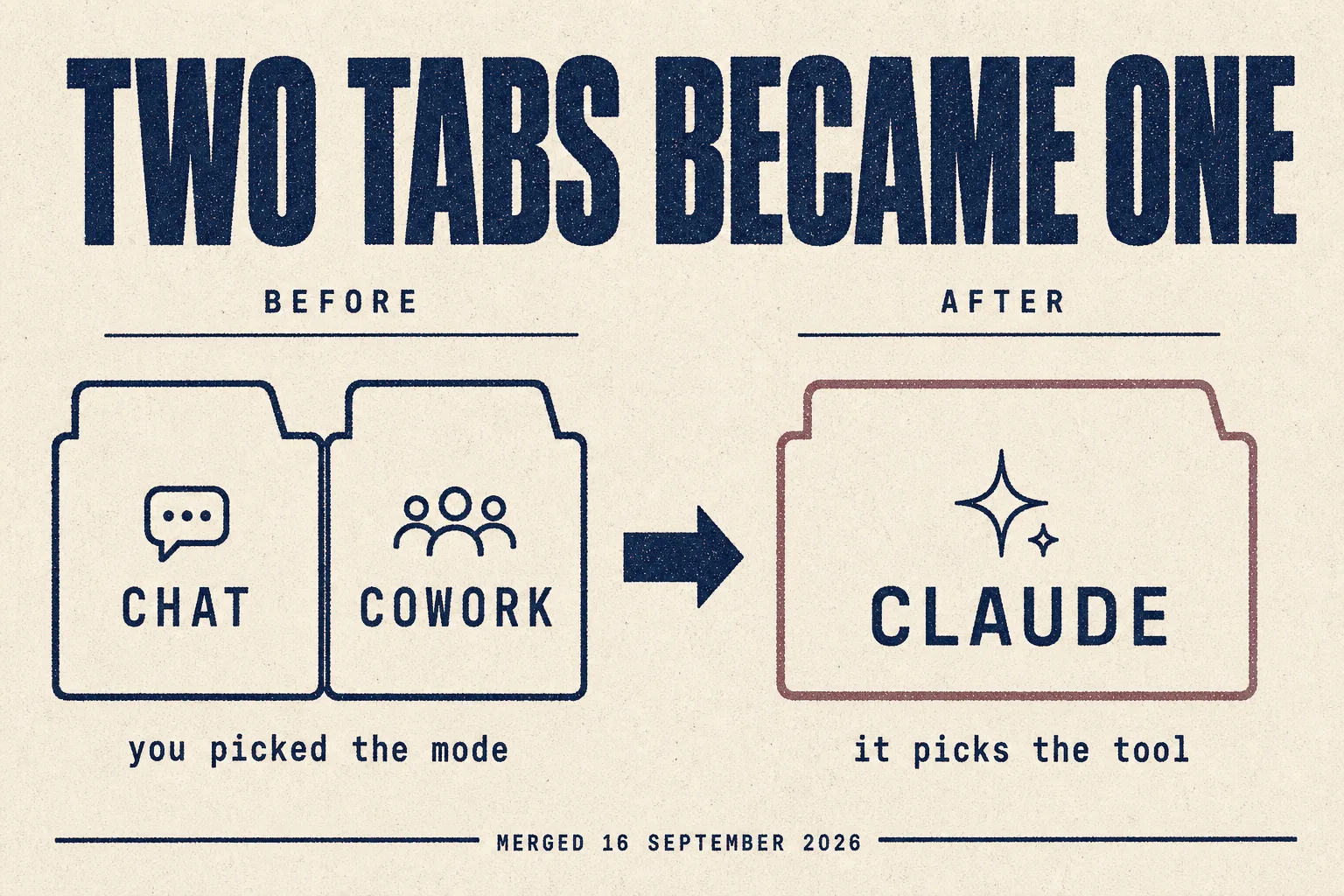
Until this month, Claude had two doors. One led to a chat. The other, Cowork, led to a workshop where it could actually build things: open your files, use a browser, make finished documents.
The trouble was choosing a door. People started in chat, realised they needed the workshop, and had to start again.
So Anthropic removed the wall. There's one room now. You ask, and Claude decides whether you need an answer or a finished piece of work.
That's convenient. It also raises a fair question, which several hundred people are asking this week: if there's no wall, how do you stop it building something when you only wanted to chat? There's a whole section on that below.
At a glance
| What it is | Claude, now with Cowork's abilities built into every conversation |
| Made by | Anthropic |
| Cowork launched | January 2026 |
| Merged into Claude | 16 September 2026, rolling out gradually |
| Cost | Free · Pro $20/mo ($17 annual) · Max from $100/mo |
| Pricing model | Subscription with usage limits, not credits that spike |
| Local access | Folders on your computer, a built-in browser, and computer use (beta) |
| Talk to it in | Web, desktop app, and phone |
| Verdict | 🔵 Trial it, but read the usage section first (judged from documentation and community reports) |
What changed on 16 September
In Anthropic's own words: "Starting today, Claude Cowork and chat are merging into one Claude."
| Before | After |
|---|---|
| Two tabs: Chat and Cowork | One conversation |
| You picked the mode | Claude picks the tool |
| Finished documents lived in Cowork | Documents, slides and designs work anywhere |
Three new things arrived the same day, all in beta on paid plans:
- Claude Docs, living documents you write together
- Claude Slides, decks you can present directly or download as PowerPoint or PDF
- Claude Design, now inside conversations rather than only on its own
Do you have it yet?
It's rolling out in stages, Pro and Max first, then Team and Free. From the official help page:
"If you're on a Pro or Max plan and your message box still shows 'Chat' and 'Cowork' options, you don't have it yet."
⚠️ One thing to know before it arrives: "Once your account has the new experience, you can't switch back to separate 'Chat' and 'Cowork' options."
Everything carries over: chats, projects, files, connectors and skills.
What it can actually do
This is the list from Anthropic's help centre, in plain English.
| Ability | What it means for you |
|---|---|
| Hand it a whole task | Describe the outcome. It searches, reads your files, runs code, and assembles the result. Several tasks can run at once |
| Step away while it works | Bigger tasks carry on in the cloud after you close the laptop |
| Get finished files back | Documents, spreadsheets with working formulas, and decks that open in PowerPoint |
| Use your connected apps | Google Drive, Gmail, Microsoft 365, Slack, pulled in as it works |
| Work on your computer | Read and organise files in a folder you choose |
| Use a browser | Open sites, read pages, click, fill forms |
| Use your computer directly | Click and type in your apps. Beta, Pro and Max only |
| Schedule recurring work | "Every Monday, summarise my inbox." Runs in the cloud, even with your computer off |
| Check in from your phone | Watch progress, answer its questions, redirect it |
| Skills and plugins | Teach it how you like a task done, once |
One important limit: tasks that touch files or apps on your computer need the desktop app open. Cloud tasks don't.
What people actually do with it
From the community, with upvotes. Anecdotes, but specific.
| What they did | Votes |
|---|---|
| Cleaned up 15 years of files across 6 hard drives and 2 computers, mostly duplicated photography and video that was jamming the drives | 19 |
| Turned a paid newsletter archive into a navigable knowledge base, over a thousand articles and a hundred PDFs they'd never have read | 23 |
| Found an in-network family doctor accepting new patients by working through a health insurer's website | 2 |
| Rescued an inbox with 20,000 unread messages, recommending which subscriptions to cancel | 2 |
| Built a plugin that learns to spot and complete recurring tasks from examples | 3 |
Note the pattern: the best reports are all tedious work across lots of files or pages. Not clever work. Work nobody had the patience for.
Getting started
Step 1 · Pick a plan
| Plan | Price | Good for |
|---|---|---|
| Free | $0 | trying it |
| Pro | $20/month, or $17 billed annually | most individuals |
| Max 5x | from $100/month | 5x Pro's usage |
| Max 20x | more | 20x Pro's usage |
Read from claude.com/pricing, 21 Sep 2026. Team and Enterprise are priced separately.
Step 2 · Install the desktop app if you want local access
The web version handles cloud tasks. Files on your computer, the built-in browser, and computer use all need the desktop app, on Mac, Windows or Linux.
Step 3 · Set your permission mode before anything else

There's a setting in the message box:
| Mode | Behaviour |
|---|---|
| Manual (the default) | Claude asks before it takes an action. You approve each one |
| Auto | It keeps working, and automated safety checks run before each action |
Leave it on Manual until you trust it with that kind of task. Anthropic's own advice: "For work with real consequences, like sending messages or changing important files, stay close and review what Claude does."
Step 4 · Give it access to one folder, not your whole drive
Step 5 · Try one tedious task
The community pattern says this is where it shines. Try something like:
Go through the files in this folder. Find duplicates and near-duplicates.
Don't delete anything. Make me a list of what you'd remove and why,
grouped by folder, with the space it would free.
By default it asks before permanently deleting anything. Still, say it.
The browser: which one to use
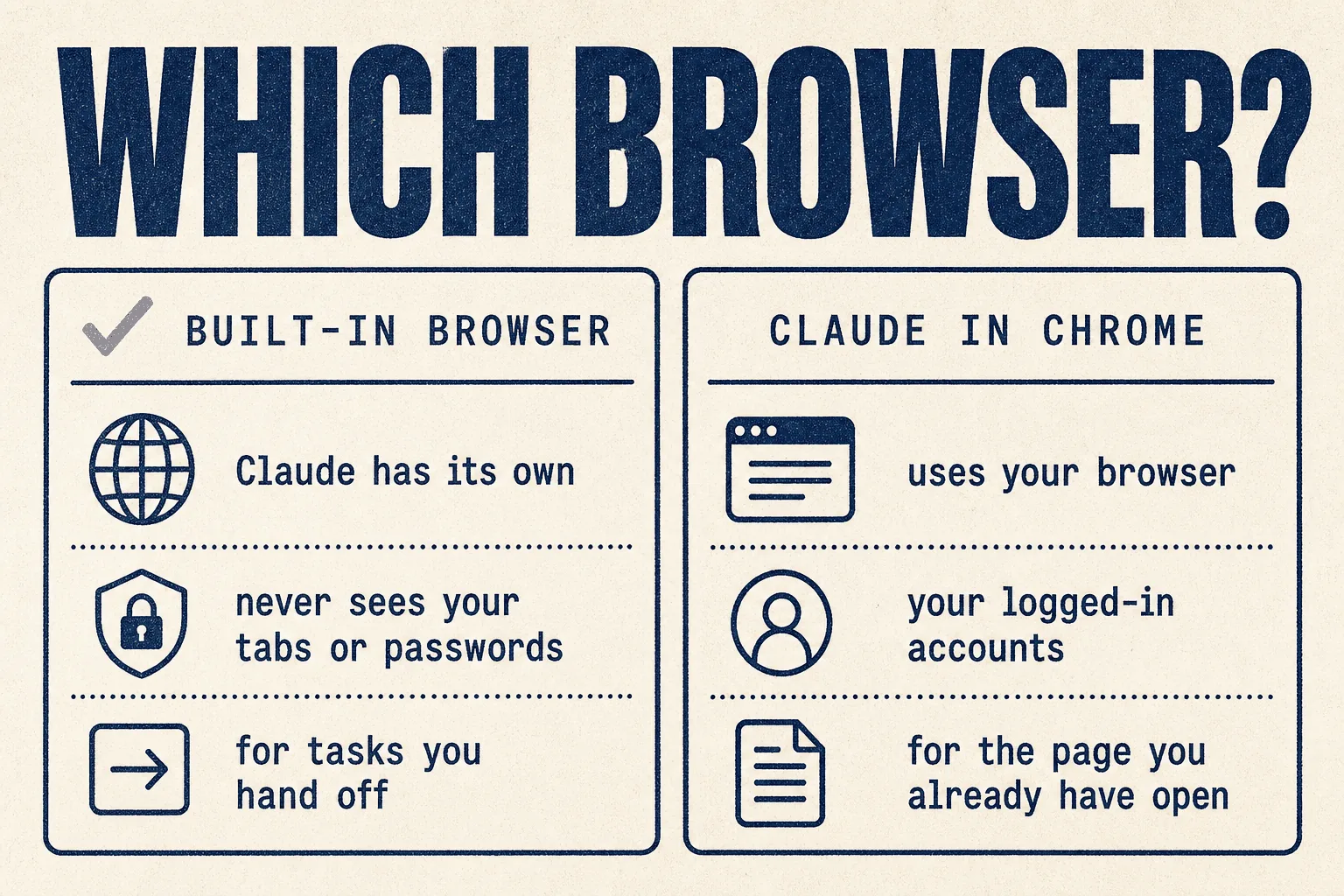
Claude can use the web two different ways, and picking the right one matters.
| Built-in browser | Claude in Chrome | |
|---|---|---|
| Whose browser | Claude's own, separate from yours | Yours, through an extension |
| Sees your tabs and passwords | Never | uses what you're logged into |
| Best for | tasks you hand off while you keep working | the page you already have open |
| Example | gathering research for a report | updating your CRM, working your inbox |
The safety detail worth knowing: when you bring your logins into the built-in browser, banking, email and single sign-on sites are left out unless you choose to include them.
And Anthropic is unusually direct about the risk:
"The built-in browser carries the same prompt injection risks as any AI agent that acts in a browser, where instructions hidden in a page try to redirect Claude. Those measures meaningfully reduce the risk but can't eliminate it, so we recommend starting on sites you trust."
That's the right advice for every agent in this library, not just this one.
⚠️ The usage-limit controversy, happening right now
This is the most important section in the guide, and it's live. The two most upvoted threads about Claude this week are both complaints about usage limits.
"Useless for real work" (585 votes, 16 Sep 2026)
"We are shocked at my workplace that the weekly usage limits seem way below the cut promised. My entire firm, which was using Claude, may be forced to dump out of Claude for work use because the Max 20x plan isn't enough and neither are the team plans. The product is no longer usable for large workflows."
The most upvoted reply, at 154 votes:
"I'm about to cancel. Only being able to use a $200/month plan for 2 to 3 days per week, while being careful, is not worth it."
"Something is wrong with usage this week" (483 votes, 20 Sep 2026)
"After one session following the weekly refresh, a single session appears to have used 15% of the weekly limit. Six or seven sessions might exhaust the full allowance."
"I'm at 83% weekly usage after maybe 5 or 6 sessions." (127 votes)
"This seems like not a bug but the new normal." (19 votes)
The other side, in fairness
Not everyone agrees. At 11 votes:
"I've been using it 8 to 10 hours per day, 5 days a week, for pure coding, and never hit the limit."
The automatic summary of the 585-vote thread described it as "a civil war over the new usage limits", with the main camp siding with the complaint.
What this means for you
- Don't commit a client process to it this week. The limits appear to be moving.
- The failure mode is different from credit-based tools. You hit a ceiling and stop. You don't get a surprise bill, the way people did with Perplexity Computer. That's a real difference, though it's little comfort mid-deadline.
- Two community hacks help, covered below.
6 hacks that put you ahead of 99% of users
1 · Ask it to audit its own token use
From a long-time Max user who suddenly burned half a weekly quota in an afternoon:
"I asked Claude to do a forensic on token usage and to optimise how skills and tools were loaded." (14 votes)
Loaded skills and tools cost usage on every turn. Turn off what a task doesn't need.
2 · Use the smaller model for routine work
"I only get a standard seat on the team plan, but I'm generally able to use it as much as I want so long as I stick to Sonnet." (7 votes)
The most capable model isn't needed for sorting files or summarising email.
3 · Schedule it, so it runs while your computer is off
Scheduled tasks run in the cloud. A Monday inbox summary doesn't need you there.
4 · Pick the right browser for the job
Built-in for hand-off work, Chrome for the page you're on. See the table above.
5 · One folder, not your whole machine
Give it the folder a task needs. You can always widen access later.
6 · Consider whether Claude Code suits you better
At 55 votes, a common discovery:
"I've never used Claude Code since I thought it was reserved for coding. I wasn't even aware Claude Code could draft documents."
And at 15 votes, the clearest description of the difference:
"Code is oriented towards building, Cowork is oriented towards chatting. Both connect to a local folder. Each one instinctively gravitates towards its actual purpose."
If you're comfortable in a terminal, see the Claude Code guide.
Mistakes to avoid
❌ Mistake 1: not knowing it can act when you meant to chat
The sharpest concern about the merge, at 13 votes:
"So now every time you use chat there's a chance it decides to do stuff on your desktop? Chat was supposed to be just for chat. The clear boundaries of each tab were a good thing."
The mitigation is real: Manual mode is the default, and it asks before acting. But notice this is the same worry people raised about Perplexity Computer. Merging chat with an agent that can act is an industry-wide pattern, and it's worth watching everywhere.
❌ Mistake 2: switching to Auto too early
Auto is fine for low-stakes work. For anything that sends a message or changes an important file, stay on Manual.
❌ Mistake 3: building a client dependency during a limits dispute
See the usage section. Wait for it to settle.
❌ Mistake 4: giving it your whole drive
One folder per task.
❌ Mistake 5: forgetting the desktop app must be open
Local files, the built-in browser and computer use all stop when the desktop app closes. Cloud tasks keep going; local ones don't.
❌ Mistake 6: assuming the merge was universally welcomed
The automatic summary of the 384-vote announcement thread called the community "overwhelmingly cynical about this change", with many suspecting it was designed to increase usage. Another reply, at 43 votes, asked Anthropic to remove a 30-day data retention policy on one model. Worth knowing the mood before you rely on it.
Best practices
✅ Manual mode by default, Auto only for low-stakes work
✅ One folder per task
✅ Built-in browser for hand-offs, Chrome for the page you're on
✅ Start on trusted sites, per Anthropic's own advice
✅ Smaller model for routine jobs
✅ Schedule recurring work rather than repeating it by hand
✅ Watch your usage meter closely this month
How it compares
| Claude | Perplexity Computer | Grok Bot | Manus | |
|---|---|---|---|---|
| Entry cost | $20/mo | $17/mo | from $20/mo | $20/mo |
| Pricing model | limits, you stop | credits, can spike | weekly allowance | credits |
| Surprise bills | no | reported | reported | reported |
| Finished docs and decks | ✅ incl. PowerPoint | ✅ | partial | ✅ |
| Local files | ✅ | ✅ | ❌ | ✅ |
| Own browser, separate from yours | ✅ | ✅ | ✅ | ✅ |
| Runs with your computer off | ✅ cloud tasks | ✅ | ✅ | ✅ |
| Asks before acting by default | ✅ | varies | varies | varies |
| Current controversy | usage limits | pushy mode switching | usage burn | ownership |
If you run a marketing or SEO agency
| Job | Fit | Note |
|---|---|---|
| Client reports and decks | 🟢 Strong | Finished PowerPoint and PDF output, from the same conversation |
| Recurring client summaries | 🟢 Strong | Scheduled, runs in the cloud |
| Research across many pages | 🟢 Good | The community's clearest win |
| Directory listings | 🟡 Possible | Built-in browser can fill forms. Start on trusted sites |
| On-page changes to live sites | 🟡 Careful | Manual mode, one site, reviewed |
| Heavy daily workloads | ⚠️ Risky this month | Given the usage dispute |
Verdict
🔵 Trial it, but not for heavy client work this month
Based on Anthropic's own documentation and pricing, plus community reports. We use Claude in our own work, which is why we've gone looking hardest for the criticism.
The capability set is the broadest in this library. Finished documents with working formulas, decks that open in PowerPoint, a browser that never sees your passwords, scheduling that runs with your computer off, and a default that asks before acting. Anthropic's safety disclosures are also the most candid of any vendor we've reviewed.
The usage limits are a live problem. Two threads with nearly 1,100 votes between them, both from this week, describe paying customers running out of allowance far faster than before. Some say they're cancelling. Some say they've never hit a limit. It's genuinely unsettled.
The failure mode is gentler than its rivals'. When you run out, it stops. It doesn't send you a bill you didn't expect. That matters.
Try it for reports, decks and tedious file or research work on the $20 plan.
Wait before relying on it for large daily workloads, until the limits settle.
This week: give it one tedious task you've been avoiding, on Manual mode, in one folder. Watch the usage meter while it runs.
Sources
Primary, checked 21 September 2026
- Claude Cowork and chat are now one Claude, Anthropic, 16 Sep 2026
- Claude gets its own browser in Cowork, Anthropic, 26 Aug 2026
- Claude Cowork and chat are one Claude, Help Centre capability list
- claude.com/pricing, plans read directly
- claude.com/product/cowork
Community reports, quoted with upvotes. Anecdotes, not measurements.
- The new usage limits make subscription and team plans useless for real work (585 votes)
- Something is wrong with usage this week (483 votes)
- Claude Cowork and chat are merging into one Claude (384 votes)
- What's the point of Cowork when you have Claude Code? (294 votes)
- Craziest thing you've done with Cowork? (174 votes)
Usage limits are changing as this is written. Check the current state before buying.
Part of The Agent Guides by Massive Impact. Illustrations generated in-house. No third-party screenshots or marks reproduced.
The rest of the guide is yours, free.
Enter your email to keep reading and get the PDF to keep.
No spam. One email unlocks every Massive Impact resource.
“SEO and search optimization always goes above and beyond my head. Marketing? I'm in the best of hands right now.”
The service behind this
More from the library
