



A faster, cheaper way to sort, score and filter at scale. It judges. It does not write.
Last verified: 21 September 2026 · 18 minute read · Some comfort with an API helps
Who this guide is for
Anyone who uses AI to sort, score, filter or decide at scale, and is paying a chat model to do it: classifying leads, flagging urgent messages, checking drafts against a brief, routing work.
If that's you, Jev may make that part of your work dramatically faster and cheaper. If you mainly use AI to write, it won't help at all, and this guide will tell you why.
By the end you'll know: what Jev is, how it differs from a normal AI model, how to try it in five minutes, how to ask it good questions, and the caveats the launch posts leave out.
In one sentence
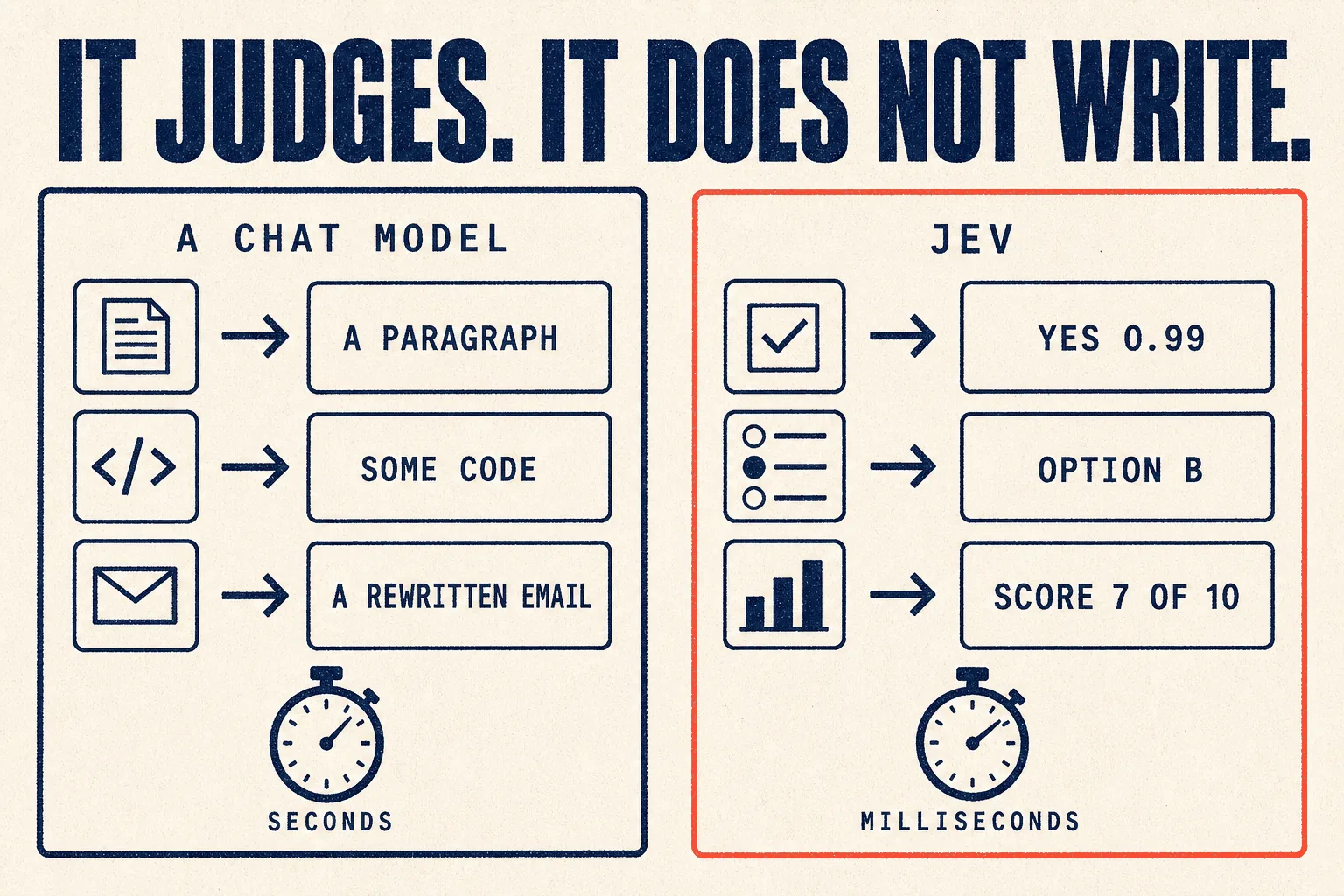
Jev is an AI model that doesn't write anything: you give it some text and a list of questions, and it answers every question at once with a yes/no, a choice or a score, each with a confidence figure, in well under a second.
The analogy that makes it click
A normal AI chat model is a thoughtful colleague. You ask a question, they think, they write you an answer. Useful, but slow, and they'll sometimes make something up.
Jev is a switch, not a colleague. Text goes in, a decision comes out. It can't ramble, it can't invent an answer outside the options you gave it, and it tells you how sure it is.
Its makers describe it as "a frontier-intelligence function call: unstructured state in, typed probabilistic decisions out."
In plain terms: it's built to sit inside your automation as a smart if-statement.
At a glance
| What it is | A "System One" model: it makes fast, structured decisions, not text |
| Made by | TypeSafe AI, founded by Diogo Almeida, who worked at OpenAI on the instruction-following research behind ChatGPT |
| Released | 15 September 2026, in early access. It's new |
| Input cost | $0.042 per million tokens ($42 per billion) |
| Output cost | Free. TypeSafe calls it "too cheap to meter" |
| Speed | 70 to 500 milliseconds per call, by TypeSafe's figures |
| Can it hallucinate? | Not in the usual sense: it can only answer from the options you define |
| Open weights? | ❌ No, and no technical paper yet |
| Verdict | 🔵 Trial it, if you classify or score at volume (judged from TypeSafe's documentation and community reports; we have not run it in production) |
How it differs from a normal AI model
From TypeSafe's own comparison:
| Normal chat model | Jev | |
|---|---|---|
| Output | text, which has to be checked and parsed | typed answers, defined in advance |
| Speed | 3 to 329 seconds end to end | 70 to 500 milliseconds |
| Input price | $0.20 to $10 per million tokens | $0.042 |
| Output price | around 5 times the input price | free |
| Confidence | tends to be overconfident when asked | every answer comes with a calibrated probability |
| Several questions | usually one after another | all at once, in parallel |
That last row is the important one. Adding more questions to the same request "barely changes the response time and costs only the tokens for the extra questions," according to LangChain's write-up.
The trade-off
It gave up writing to get everything else. If you need a paragraph, an email, code, or a rewritten sentence, that's still a job for a chat model.
The three kinds of question
Every question you ask Jev is one of three types.
| Type | Answers | Example |
|---|---|---|
| Noul | yes or no, as a probability | "Does this message express urgency?" → 0.999 |
| Choice | picks one option from a list, with a probability for each | "Which department should handle this?" → billing |
| Score | rates on an ordered scale | "How serious is this complaint?" → high |
("Noul" is TypeSafe's name for a yes/no question.)
Try it in five minutes
Step 1 · Sign up
Create an account at console.typesafe.ai. It launched in early access, so check current availability when you sign up.
Step 2 · Use the playground first
Open the Playground, paste some text as the "state", and add a question. TypeSafe's own starter example:
State:
Hi, I've been trying to connect my Stripe account for 3 days and the
integration keeps failing. I'm losing sales. Please help ASAP.
Question:
{
  "urgency": {
    "type": "noul",
    "instructions": "Does this message express urgency?"
  }
}
Then add more questions and watch them all come back together.
Step 3 · Call the API
Get an API key from the dashboard, then:
curl -X POST https://api.typesafe.ai/v1/systemone \
  -H "Authorization: Bearer $TYPESAFE_API_KEY" \
  -H "Content-Type: application/json" \
  -d '{
    "model": "jev-latest",
    "state": "Hi, I have been trying to connect my Stripe account for 3 days and it keeps failing. I am losing sales. Please help ASAP.",
    "questions": {
      "urgency": { "type": "noul", "instructions": "Does this message express urgency?" }
    }
  }'
Step 4 · Or use it through LangChain
If you already build with LangChain, there's an official integration:
pip install langchain-typesafe
from langchain_typesafe import Noul, TypeSafeClassifier

classifier = TypeSafeClassifier()
response = classifier.invoke({
    "state": "The deploy failed twice and customers are seeing errors. Can someone look now?",
    "questions": {"urgent": Noul(instructions="Does this need attention right now?")},
})
urgency = response.nouls["urgent"].noul
How to ask good questions
The best practical advice in the community is a post called "10 Jev Commandments". The core ideas:
1 · It judges. It doesn't create.
"If you want a paragraph, arbitrary JSON, a rewritten command, code, that's usually an LLM job. If you want yes/no, which option, how strong, is this suspicious, that's Jev territory."
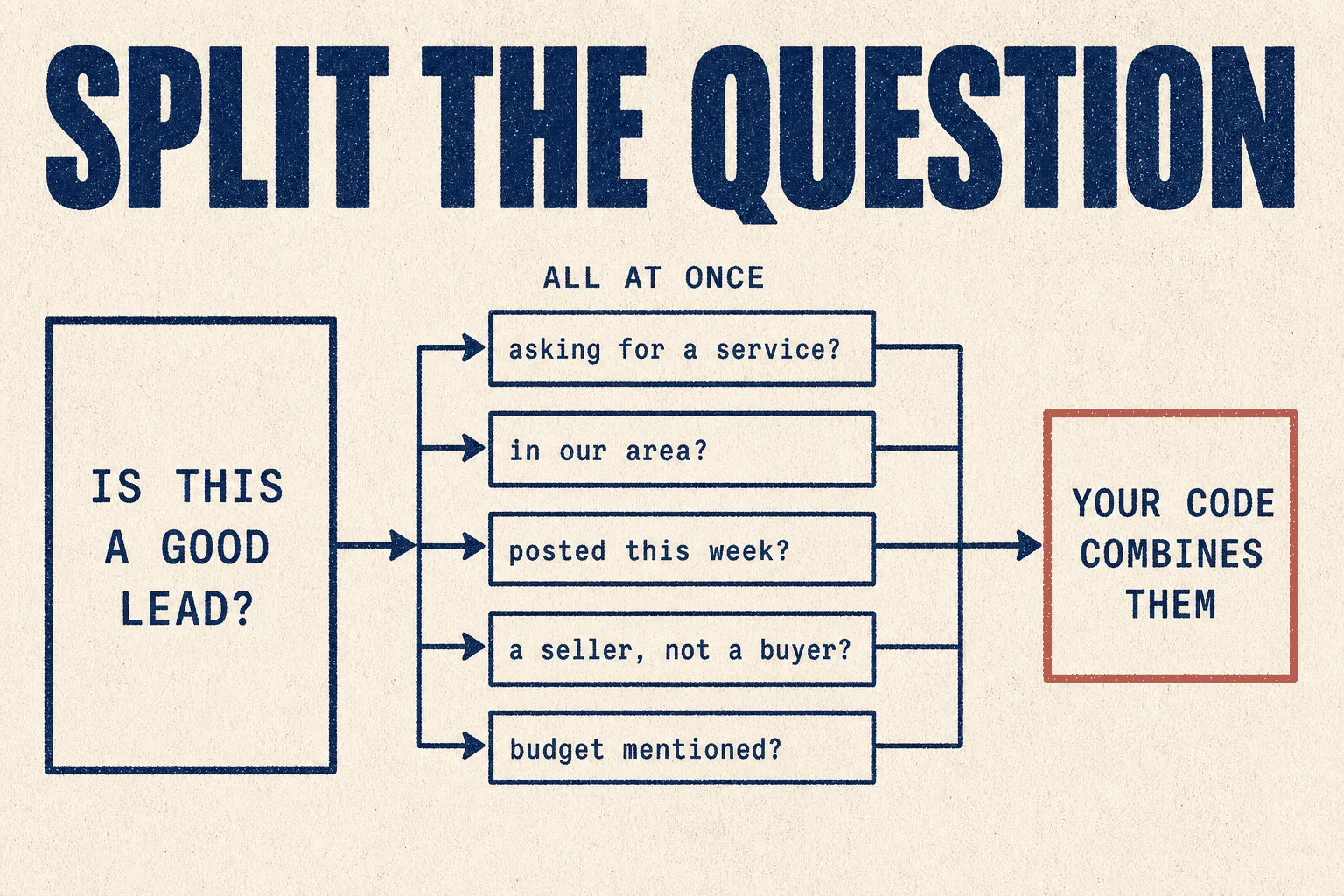
2 · Ask tiny questions, not giant ones
"Bad: 'Is this extraction good?' Better: 'Is this field hallucinated?' 'Is this field missing something?' 'Does this value violate the requested format?'"
3 · One hard problem becomes many simple judgements
"Complex task → 20 tiny decisions → ordinary code combines them."
4 · Ask independent questions together
If the questions all look at the same text, put them in one request. They run at the same time.
5 · Chain only when one answer depends on another
"Independent = parallel. Dependent = chain."
6 · Use it as a bouncer
Let a cheap model do the work, then ask Jev whether anything looks wrong before it goes further, instead of sending everything to an expensive model.
What people are building with it
From a developer who checked 287 open-source Jev projects to confirm each one genuinely used it (157 votes):
"Jev is rarely the thing writing code, generating long text, or doing the heavy reasoning. It usually sits inside a loop and answers much smaller questions: which action? Which file? Keep or drop? Safe or unsafe? Route to which model? What should happen next?"
Examples from the community:
| Project | What Jev does in it |
|---|---|
| Browser agent control | looks at the page and picks which element to click, calling a text model only when something needs typing |
| Idea scoring | ten questions about a business idea, answered in parallel, combined into one score (232 votes) |
| Code quality checks | judging test coverage and quality for coding agents |
| Game playing | a DOOM demo reportedly making 10 decisions a second for about $7 an hour (89 votes) |
That first one connects to the browser agents guide: Jev deciding what to click is one answer to browser agents being slow and expensive.
⚠️ The caveats the launch posts leave out
It's six days old
Released 15 September 2026. Nobody has long-term production experience with it yet.
It's not open, and there's no technical paper
The most upvoted Jev-related post anywhere, at 2,813 votes, is from a researcher who says they published a similar approach in March 2025, with an academic paper, open model and open dataset. They point out Jev launched "without technical papers, open weights and no open dataset." That doesn't make Jev worse. It does mean you can't inspect it or run it yourself.
The benchmarks are TypeSafe's own
TypeSafe is unusually candid about this. Its launch post notes that its evaluation workflows "were made by individuals on our model capabilities team, so some bias could exist," and that its headline speed and cost gains "are on the higher end of real world gains."
The pricing might not last
Also in TypeSafe's own words: "We can't prove it isn't subsidized." They say they expect prices to fall, not rise.
Some uses cost more than they save
A developer used Jev to shrink an agent's working memory in Hermes, cutting context by 75% against 55% for the standard method (133 votes). Two replies matter:
"It breaks your cache. More expensive sessions." (relayed from a Hermes co-founder, 15 votes)
"Deleting tool calls based on relevance scores can remove critical state and make the agent repeat work." (19 votes)
Faster and cheaper per call isn't always cheaper overall. Test the whole workflow, not just the call.
The hype is loud
From a thread about Jev projects (21 votes):
"The number of Jev posts I'm seeing are increasingly looking and reading like ads."
Judge it on your own test.
Mistakes to avoid
❌ Mistake 1: asking it to write
It can't. Use a chat model for anything that produces text.
❌ Mistake 2: asking one vague question
"Is this good?" gets a weak answer. Five specific questions get a strong one.
❌ Mistake 3: chaining questions that could run together
You lose the speed advantage.
❌ Mistake 4: trusting the headline savings without testing
TypeSafe itself says its figures are at the high end. Measure your own workflow.
❌ Mistake 5: building a critical dependency on a six-day-old service
Keep a fallback to a normal model until it's proven for your use.
Best practices
✅ Break every judgement into small, specific questions
✅ Ask independent questions in one request
✅ Use the confidence score: act automatically when it's high, send to a human when it's not
✅ Pair it with a chat model: Jev decides, the chat model writes
✅ Test the whole workflow's cost, not only the per-call price
✅ Keep a fallback while it's new
If you run a marketing or SEO agency
This is where it could change your costs most, because agency automation is full of yes/no and scoring decisions.
| Job | Fit | Example questions |
|---|---|---|
| Classifying scraped leads | 🟢 Strong | Is this person asking for a service? In our area? Posted recently? A seller rather than a buyer? |
| Triage of client messages | 🟢 Strong | Is it urgent? Which client? Which team? |
| Checking drafts against a brief | 🟢 Good | Does it target the keyword? Is each claim sourced? Is the tone right? |
| Filtering search or directory results | 🟢 Good | Is this result relevant? Is this listing a real business? |
| Guardrails before publishing | 🟢 Good | Does this draft contain anything risky? |
| Writing content, briefs or outreach | 🔴 No | that's a chat model's job |
The practical pattern: use Jev to decide which of 1,000 scraped forum posts are real buyers, then use a chat model to write replies only for the handful that are. That's the split between judging and writing, and it's where the savings are.
Verdict
🔵 Trial it, if you classify or score at volume
Based on TypeSafe's own announcement and documentation, LangChain's integration guide, and community reports. We have not run it in production.
It's a genuinely different kind of model. Instant, cheap, structured answers with honest confidence scores are exactly what most business automation needs, and exactly what chat models are slow and expensive at.
It's also six days old, closed, and benchmarked by its makers. TypeSafe is refreshingly upfront about those limits. Take them seriously.
Try it if you're paying a chat model to sort, score or filter things at volume. That's the job it was built for.
Skip it if your AI use is mostly writing.
This week: take a task where you currently ask a chat model a yes/no question hundreds of times, break it into five small questions, and run a batch through the playground. Compare the answers and the cost with what you pay now.
Sources
Primary, checked 21 September 2026
- Introducing System One Models and Jev, TypeSafe AI, 15 Sep 2026, including its own caveats
- TypeSafe quick start, playground and API
- Building a harness with Jev, LangChain, 17 Sep 2026
- TypeSafe workflow evaluations
Community reports, quoted with upvotes. Anecdotes, not measurements.
- I built the Jev architecture a year ago and open-sourced it (2,813 votes)
- I built a side project to test Jev (232 votes)
- I reviewed 287 open-source Jev projects (157 votes)
- Integrated the Jev context engine into Hermes (133 votes)
- 10 Jev Commandments
Part of The Agent Guides by Massive Impact. Illustrations generated in-house. No third-party screenshots or marks reproduced.
The rest of the guide is yours, free.
Enter your email to keep reading and get the PDF to keep.
No spam. One email unlocks every Massive Impact resource.
“The analytics are set up so I can see who's been on my website, when are they on, what stage are they on. And then it's all connected to my booking system.”
The service behind this
More from the library
