


The home service buyer is the easiest lead magnet target in 2026. They're local. They're urgent. They're already comparing vendors before they hit your site. And most home service businesses ship the wrong magnet entirely, which is good news for the ones reading this.
This is a working playbook. 12 magnet ideas, the ideation template that lets you spawn another 12 for any vertical you're in, format specs, the local-SEO multiplication layer, distribution channels, a 6-week launch plan, and 8 mistakes that tank conversion. No theory padding. Built so a roofer in Phoenix or an HVAC operator in Tampa can open this on a Monday and ship a real magnet by Friday.
Part 1: Why Home Service Lead Magnets Convert Differently
The standard internet marketing advice on lead magnets was written for course creators and SaaS founders. It does not apply cleanly to home service businesses. The buyer is wired differently, the decision is bigger, the comparison set is smaller, and the timeline is tighter.
Here's what makes the home service buyer unique.
They are local. They're not researching from anywhere. They're researching from a specific zip code, looking for someone who can be in their driveway this week or next. National-feeling content makes them bounce.
They are urgent. A leaking water heater, a broken HVAC in July, a roof shingle on the lawn after a storm. The decision is on a clock. They will not download a 40-page guide and read it over the weekend. They want the answer in 90 seconds.
They are comparing 2 to 3 vendors. Not 8. Not 1. Two or three. They've already opened your competitor's tab in another browser window. Your magnet is also a positioning tool, not just a lead capture.
The decision is five figures. A new HVAC system runs $8,000 to $15,000. A roof replacement, $10,000 to $25,000. A kitchen remodel, $30,000 to $80,000. Even a deck or a fence is a $5,000 to $20,000 swing. Buyers are scared of overpaying and scared of hiring the wrong person. Both fears beat the fear of giving up an email address.
They need price ranges, process clarity, and proof. Not entertainment. Not motivation. Not a 10-step framework for becoming a better homeowner. They want to know what it costs, how long it takes, and why they should believe you.
So which lead magnet patterns work and which flop?
The 5 patterns that work in home service:
Cost calculators. They give the buyer the answer to their #1 question (how much) before any vendor pitch. They convert at 30 to 40 percent in the home service category, the highest of any format.
Decision support tools (repair vs replace, material A vs material B, DIY vs hire). They reduce the cognitive load on a five-figure choice. Conversion in the 25 to 35 percent range.
Local checklists (permit cheat sheets, vendor vetting worksheets, pre-project lists). They feel like insider knowledge and are quick to consume. 20 to 30 percent.
Diagnostics (HVAC not cooling? Drain not draining? Lights flickering?). They serve the urgent buyer right at the point of pain. 25 to 35 percent.
Maintenance calendars (what to do month by month for HVAC, lawn, pool, pest). They turn a one-time visitor into a recurring relationship. Lower conversion (15 to 25 percent) but the highest LTV.
The 5 patterns that flop in home service:
Generic ebooks ("The Ultimate Guide to Homeownership"). Too long, too unfocused, too obviously a content marketing artifact.
Webinars. The buyer is not sitting through a 45-minute live session about kitchen design. They're scrolling on a phone between meetings.
Newsletter signups with no asset attached. The buyer does not want a relationship. They want a quote.
National-flavored content. "Top 10 Roofing Trends" with stock photos of houses in California when the buyer is in Cleveland. Bounces every time.
Email courses. A 7-day drip teaching the buyer about heat pumps. They needed the answer yesterday. The drip is too slow for the urgency level.
The pattern: home service magnets succeed when they answer a specific, urgent, locally-flavored question in under 5 minutes. Everything else is content marketing theater.
One more thing on the buyer mindset that nobody talks about. Home service buyers do not feel like consumers. They feel like reluctant project managers. They didn't want this. The water heater broke, or the realtor said the kitchen has to be redone before listing, or the deck failed inspection. The project was forced on them. So when your magnet shows up on their screen, they're not in shopping mode, they're in damage-control mode. The magnets that win in this category don't sell. They reduce panic.
There's more pattern data and conversion benchmarks at winmassiveimpact.com
Part 2: The 12 Lead Magnet Ideas
Twelve concepts, each with a format spec, three vertical-specific examples, and the headline pattern that sells the click. Pick one or pick several. Most home service operators can run 3 to 5 of these in parallel without channel cannibalization.
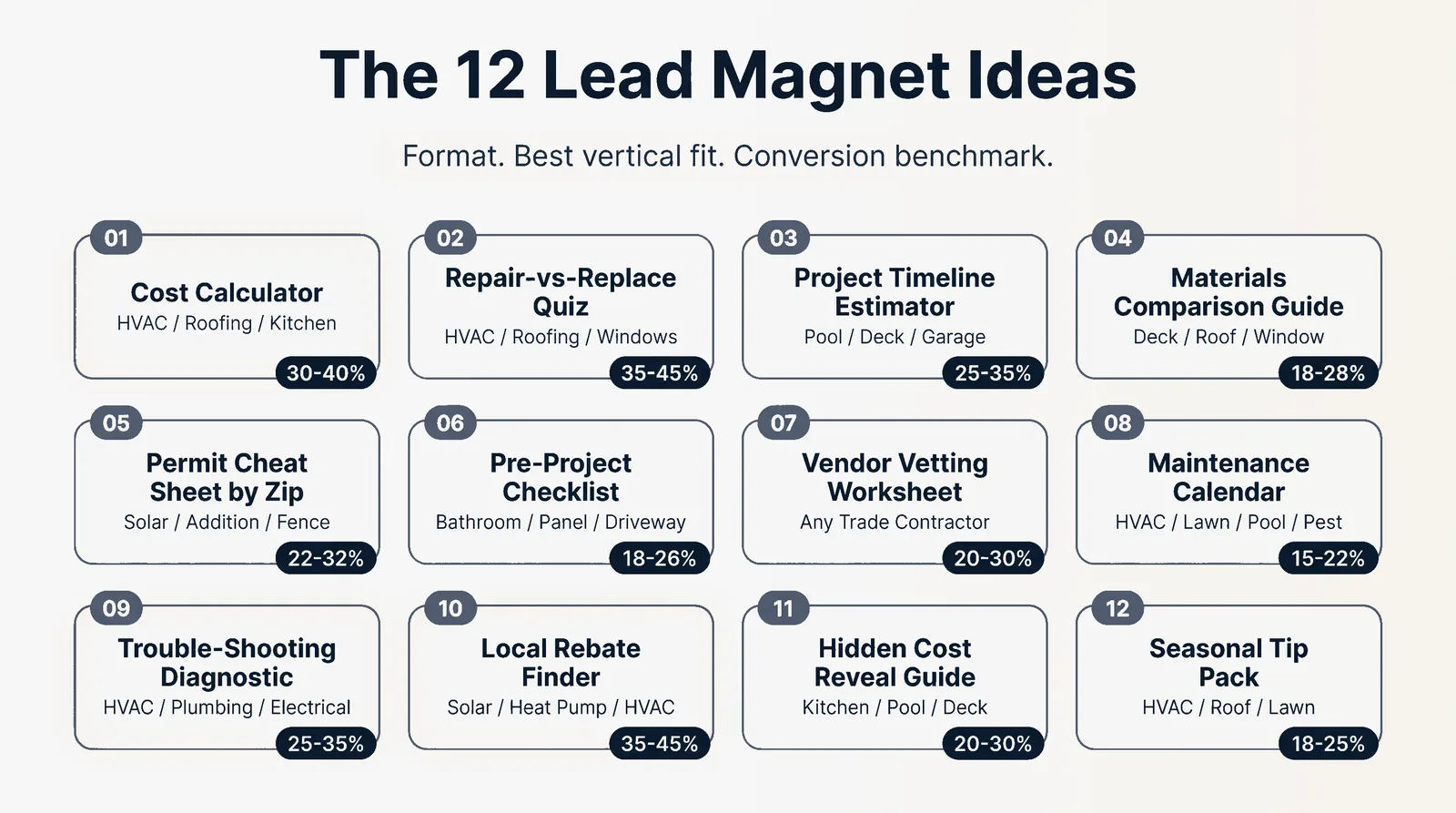
Idea 1: The Cost Calculator
What it is: An interactive web tool that takes 4 to 8 user inputs and returns an estimated price range. Email-gated for the detailed PDF breakdown.
Format spec: 4 to 6 input fields (zip code, project size, scope toggles, quality tier). Instant on-screen range. Email gate for the line-item PDF. Build on Outgrow ($79 per month), Typeform ($25 per month), or a custom Vue/React widget for $1,500 to $3,000.
Conversion benchmark: 30 to 40 percent of calculator-starts to email captures.
Three vertical examples:
- HVAC system replacement. Inputs: zip, home square footage, system type (AC only / heat pump / dual fuel), efficiency tier (standard / mid / premium). Output: $7,200 to $14,500 range with rebate notes for the user's state.
- Roof replacement. Inputs: zip, roof square footage, current material, replacement material, complexity (single story / multi-story / steep pitch). Output: $9,800 to $22,400 range, broken into materials, labor, tear-off, and disposal.
- Kitchen remodel. Inputs: zip, kitchen size, scope (cosmetic / mid / full gut), tier. Output: budget breakdown across cabinets, counters, appliances, and labor.
Idea 2: The "Should I Repair or Replace?" Quiz
What it is: A 6 to 10 question quiz that ends in one of two clear recommendations: repair or replace. Each path delivers a follow-up PDF.
Format spec: 8 questions. Branching logic on the last 2 questions based on age and repair history. End screen splits into "REPAIR (and here's how to extend life)" or "REPLACE (and here's how to budget)". Build on Typeform or Tally (free).
Conversion benchmark: 50 to 60 percent quiz completion. 35 to 45 percent of completers give an email for the result PDF.
Three vertical examples:
- HVAC. Age, refrigerant type, repair frequency, energy bill trend, comfort issues. Older R-22 systems with rising bills get the "REPLACE" path with a payback calc.
- Roofing. Age, visible damage, leak history, attic insulation condition, plans to sell. Anything past 18 years with leaks gets the "REPLACE" path with material options.
- Windows. Age, single vs double pane, drafty rooms, condensation between panes, plans to sell. Single-pane plus condensation gets "REPLACE" with an energy savings projection.
Idea 3: The Project Timeline Estimator
What it is: A tool that returns a week-by-week project timeline based on scope, season, and zip-code permit speed.
Format spec: 5 inputs (project type, scope, zip, ideal start date, contingency tolerance). Output: a Gantt-style timeline showing permit, demo, install, inspection, and finish phases with realistic week ranges. PDF export for the email gate.
Conversion benchmark: 25 to 35 percent.
Three vertical examples:
- Pool install. 12 to 20 week timeline accounting for permit (3 to 5 weeks in most jurisdictions), excavation weather windows, gunite cure time, decking, and final inspection.
- Deck build. 4 to 8 week timeline with permit, footings cure, framing, decking, railings, and final inspection.
- Garage conversion. 8 to 14 week timeline including permit, framing changes, electrical/HVAC rough-in, drywall, finish, and CO inspection.
Idea 4: The Materials Comparison Guide
What it is: A side-by-side comparison PDF that helps the buyer pick between 2 to 4 material options on cost, lifespan, maintenance, and resale.
Format spec: 6 to 10 page PDF. Comparison table on page 2. One page per material with pros, cons, cost per square foot, expected lifespan, maintenance burden, and warranty norms. Build in Canva or Notion + PDF export.
Conversion benchmark: 18 to 28 percent.
Three vertical examples:
- Composite vs wood deck. Cost per square foot, 25-year cost-of-ownership including stain/seal labor, slip resistance, heat retention, look.
- Asphalt vs metal roof. $4 to $7 per sq ft asphalt vs $11 to $18 per sq ft metal. 20-year vs 50-year lifespan. Insurance discount differences.
- Vinyl vs wood window. Frame cost, U-factor differences, paint maintenance, replacement frequency.
Idea 5: The Permit Cheat Sheet by Zip Code
What it is: A short PDF that tells the buyer exactly what permits they need, who issues them, what they cost, and how long they take. Customized to their zip.
Format spec: 2 to 4 page PDF. Generated dynamically per zip code from a permit database, or built as a 12-page master with a state index. Could also live as a tool with a zip lookup.
Conversion benchmark: 22 to 32 percent. Higher in projects where buyers are nervous about permits.
Three vertical examples:
- Solar. Local utility interconnection forms, AHJ permit cost, HOA approval steps if applicable, average wait time end-to-end.
- Home addition. Building permit, zoning variance triggers, setback requirements, plan review timeline.
- Fence. Whether a permit is needed (varies wildly by city), height limits, setback rules, HOA approval steps.
Idea 6: The Pre-Project Checklist
What it is: A 1 to 2 page printable checklist of everything the buyer needs to do, decide, or move before the crew arrives.
Format spec: Single page or two-page PDF. Three sections: "Before quotes" (measurements, photos, budget), "Before contract" (verify license, references, insurance), "Before crew arrives" (clear the space, plan a backup bathroom or kitchen, notify neighbors).
Conversion benchmark: 18 to 26 percent.
Three vertical examples:
- Bathroom remodel. Where you'll shower for 3 weeks. How to protect adjacent flooring. The 4 fixture decisions to lock before demo.
- Electrical panel upgrade. Power-down windows, what to unplug, the freezer plan.
- Driveway install. Vehicle parking plan, garage access plan, the 7 to 10 day cure timeline.
Idea 7: The Vendor Vetting Worksheet
What it is: A scoring worksheet the buyer fills out as they interview 3 contractors. Forces apples-to-apples comparison and surfaces red flags.
Format spec: 1 to 2 page printable worksheet with 3 columns (one per contractor) and 12 to 16 rows (license, insurance, references, years in business, deposit terms, change order process, warranty, written scope, communication response time, BBB rating, reviews count, payment terms).
Conversion benchmark: 20 to 30 percent. This one performs unusually well because buyers feel out of their depth interviewing contractors.
Worked example: "Print this worksheet. Bring it to all 3 estimates. The contractor who refuses to fill it out is telling you something."
Idea 8: The Maintenance Calendar
What it is: A 12-month visual calendar showing what to do month by month to keep a system running.
Format spec: Single-page PDF designed as a printable wall calendar, or a Google Calendar import file (.ics) for the more organized buyer. Each month has 1 to 3 specific tasks.
Conversion benchmark: 15 to 22 percent. Lower than calculators but higher LTV: these buyers become recurring service customers.
Three vertical examples:
- HVAC. Filter changes (monthly), coil cleaning (spring), condensate line flush (summer), heat exchanger inspection (fall).
- Lawn care. Pre-emergent (March), aeration (April), fertilizer schedule, fall overseeding, winter mower service.
- Pool. Open (April), chemical schedule by month, equipment inspection, close (October), winter cover check.
- Pest control. Quarterly perimeter treatment, spring termite inspection, fall rodent prevention, summer mosquito treatment.
Idea 9: The Trouble-Shooting Diagnostic
What it is: A decision tree that helps the buyer self-diagnose a problem before calling for service. The buyer arrives at one of three outcomes: "DIY fix (here's how)", "Call a pro now", or "Schedule routine service".
Format spec: Single-page PDF or interactive web flowchart. Starting symptom at top, 3 to 5 binary questions, 6 to 9 leaf outcomes.
Conversion benchmark: 25 to 35 percent. Catches buyers in active panic mode.
Three vertical examples:
- HVAC not cooling. Is the thermostat on cool? Is the breaker tripped? Is the outdoor unit running? Is the filter clogged? Each path leads to DIY or "schedule a tune-up" or "emergency call".
- Drain not draining. Single fixture or multiple? Toilet too? Recent grease/wipes? Outcomes range from a $4 hair snake to "call a pro for a main line snake".
- Lights flickering. One fixture, one room, or whole house? Recent storm? Outcomes include bulb swap, breaker check, or "call an electrician now (this could be a panel issue)".
Idea 10: The Local Rebate Finder
What it is: A tool or PDF that surfaces every federal, state, utility, and manufacturer rebate the buyer qualifies for on a specific project.
Format spec: Web tool with zip + project type inputs. Pulls from a rebate database (DSIRE for energy, plus utility-by-utility data). Returns a personalized stack of rebates with dollar amounts and links. PDF export for email gate.
Conversion benchmark: 35 to 45 percent. Highest of any format I've benchmarked. The buyer feels they're "leaving money on the table" if they skip it.
Three vertical examples:
- Solar. Federal Investment Tax Credit (30 percent through 2032), state rebates, utility net-metering credits, SREC markets in eligible states.
- HVAC efficiency rebate. Inflation Reduction Act high-efficiency heat pump credit (up to $2,000), manufacturer mail-in rebates, utility company rebates by zip.
- Heat pump incentive. State-specific Home Energy Rebate (HEEHRA / HOMES) program tiers based on income, plus the IRA credit.
Idea 11: The "Hidden Cost" Reveal Guide
What it is: A short PDF that surfaces the 5 to 8 line items most buyers forget when budgeting. Builds trust by giving the buyer ammunition against shady quotes.
Format spec: 4 to 6 page PDF. One page intro, one page per hidden cost category, one page summary checklist.
Conversion benchmark: 20 to 30 percent. Buyers love feeling let in on a secret.
Three vertical examples:
- Kitchen remodel. Permit fees, dumpster rental, temporary kitchen setup, electrical/plumbing surprises behind walls, appliance disposal, tile/flooring transitions to adjacent rooms.
- Pool install. Decking, fencing (often required by code), electrical service upgrade for the pump, landscaping repair, the first season of chemicals and equipment.
- Deck build. Permit fees, footing inspections, post-tear-off siding repair, stain/seal in year 1, railings up to code if existing height is grandfathered.
Idea 12: The Seasonal Tip Pack
What it is: A short, season-specific PDF with 5 to 10 tasks the buyer should do this season for their system. Distributed seasonally to drive recurring engagement.
Format spec: 3 to 5 page PDF. Released quarterly. Each release becomes a fresh email/social campaign.
Conversion benchmark: 18 to 25 percent per release. Compounds over time as the buyer collects all 4 seasonal packs.
Three vertical examples:
- Winter HVAC prep. Furnace tune-up signs, frozen-pipe prevention, thermostat schedule, humidifier setup, when to switch from heat pump to backup heat.
- Spring roof inspection. Post-winter damage walk-around, gutter cleaning, attic ventilation check, missing shingle replacement.
- Fall lawn care. Aeration timing, overseeding, leaf management, mower winterization, last fertilizer application.
That's the 12. Pick by your conversion goal, your build capacity, and how confident you are in your zip-code-specific data.
Part 3: The Ideation Template
The 12 above are a starting library. The real value is the framework that lets you generate your own 12 for any home service vertical. Five steps. Walk through it once and you'll have a backlog of 20 magnet ideas for whatever niche you're in.
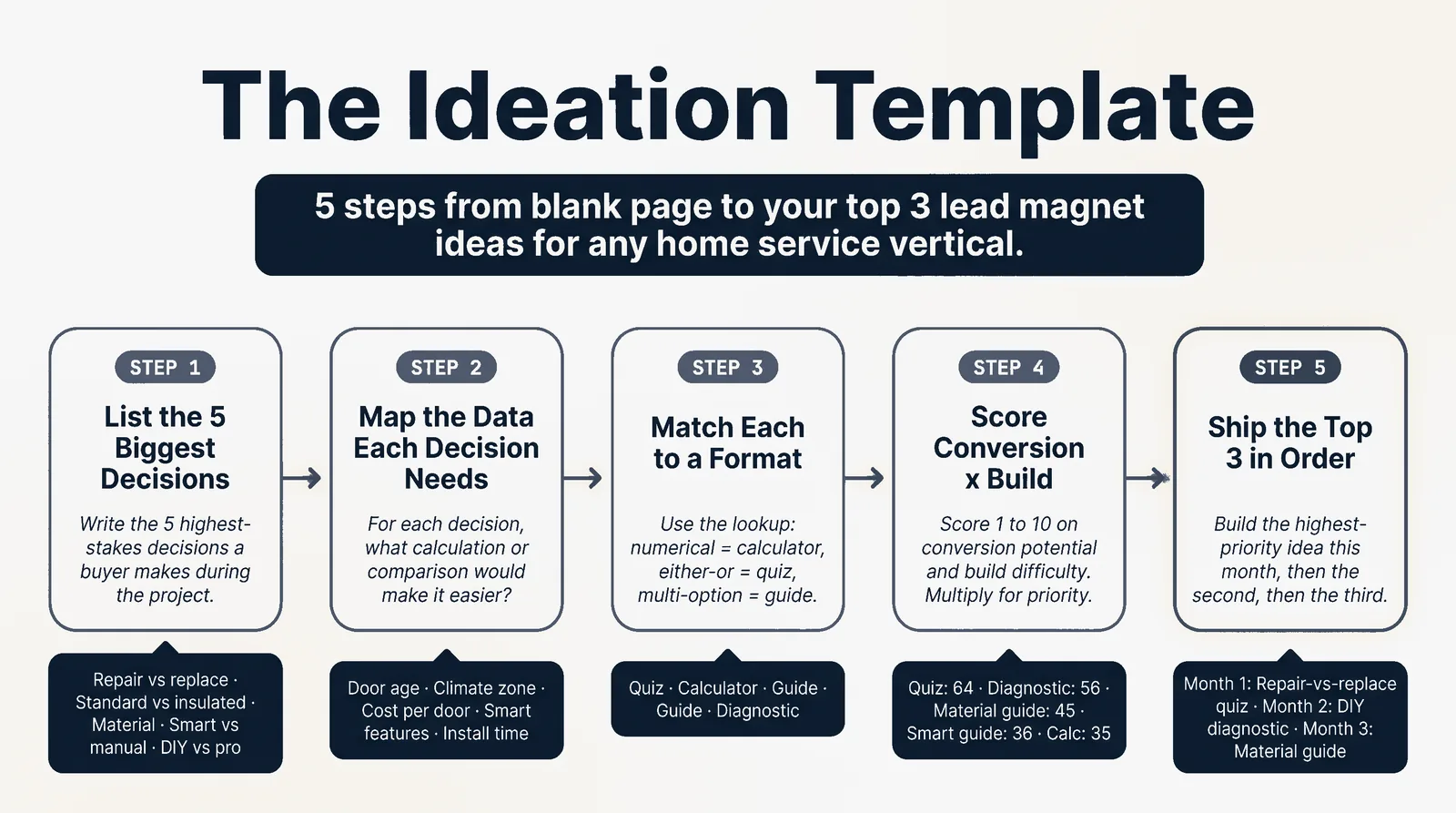
Step 1: List the buyer's 5 biggest decisions
Sit down with a pen and write the 5 highest-stakes decisions a buyer makes during the project. Not features. Decisions.
For a garage door installer, the 5 decisions might look like:
- Repair the existing door or replace it
- Standard or insulated
- Steel, aluminum, wood, or composite material
- Manual or smart-opener with WiFi
- DIY install or hire a pro
For a pest control operator: detect (have I got a problem?), severity (how bad), method (chemical, heat, baiting), provider (DIY, big chain, local), schedule (one-time, quarterly, monthly).
For each vertical, the buyer's decisions are different. Write them down for yours.
Step 2: For each decision, ask what data, calculation, or comparison would help
Now go decision by decision. For each one, ask: what specific piece of information would make this decision easier?
For garage door decision #1 (repair vs replace), the helpful data is: door age, repair history, energy efficiency loss, resale value impact. That's the input set for a quiz.
For decision #2 (standard vs insulated), the helpful data is: climate zone (zip), garage usage (workshop / car only / attached living space below), R-value differences. That's the input set for a calculator.
For decision #3 (material), the helpful data is: cost per door, lifespan, maintenance, look. That's a comparison guide.
For decision #4 (smart vs manual), the helpful data is: feature comparison, cost of opener vs door bundle, integration with existing smart home. Comparison guide.
For decision #5 (DIY vs pro), the helpful data is: install time honest estimate, tool rental cost, the 3 things that go wrong, warranty implications. Diagnostic.
You're now sitting on 5 magnet ideas you haven't built yet.
Step 3: Match each to a magnet format
Use this lookup:
- Numerical answer needed (cost, ROI, payback) → Calculator
- Either-or decision → Quiz
- Multiple options to weigh → Comparison guide
- Process or sequence to follow → Checklist or timeline
- Symptom or problem to diagnose → Decision tree / diagnostic
- Money to claim → Rebate finder
- Recurring schedule to maintain → Calendar
- Local-specific information → Zip-code lookup or permit cheat sheet
For the garage door installer, applying the lookup:
- Decision 1 (repair vs replace) → Quiz
- Decision 2 (standard vs insulated) → Calculator (energy savings + payback)
- Decision 3 (material) → Comparison guide
- Decision 4 (smart vs manual) → Comparison guide
- Decision 5 (DIY vs pro) → Diagnostic with honest "you should DIY this" or "call a pro" outcomes
Step 4: Score each idea by conversion potential and build difficulty
Two columns. Score each on a 1 to 10 scale.
Conversion potential signals: How urgent is the underlying decision? Is there a money component (rebate, payback)? Is there a fear component (overpaying, hiring wrong)? Higher urgency, higher money, higher fear = higher score.
Build difficulty signals: How long to design and ship? Does it need a developer? Does it need data you have to source? Does it need accurate per-zip information? Higher difficulty = lower score on this axis (you want low difficulty for fast wins).
Multiply the two for an Idea Priority Score.
Example for garage door:
- Repair-vs-replace quiz: Conversion 8, Build 8 (Tally / Typeform, 4 hours of work) = 64
- Energy-savings calculator: Conversion 7, Build 5 (needs a custom widget, R-value math) = 35
- Material comparison guide: Conversion 5, Build 9 (PDF in Canva, 3 hours) = 45
- Smart vs manual guide: Conversion 4, Build 9 = 36
- DIY vs pro diagnostic: Conversion 7, Build 8 (single-page decision tree) = 56
Step 5: Pick the top 3 and build in order
Top 3 from the garage door example: repair-vs-replace quiz (64), DIY vs pro diagnostic (56), material comparison guide (45). Build in that order. Ship the highest-priority idea this month, the second next month, the third the month after.
Three magnets in 90 days, all targeting different buyer intents in the same vertical. That's a working lead funnel.
If you want a worked spreadsheet of this template scored across 8 home service verticals, it's at winmassiveimpact.com
Part 4: Format Specs Cheat Sheet
The 5 main lead magnet formats and what each one actually requires to ship.
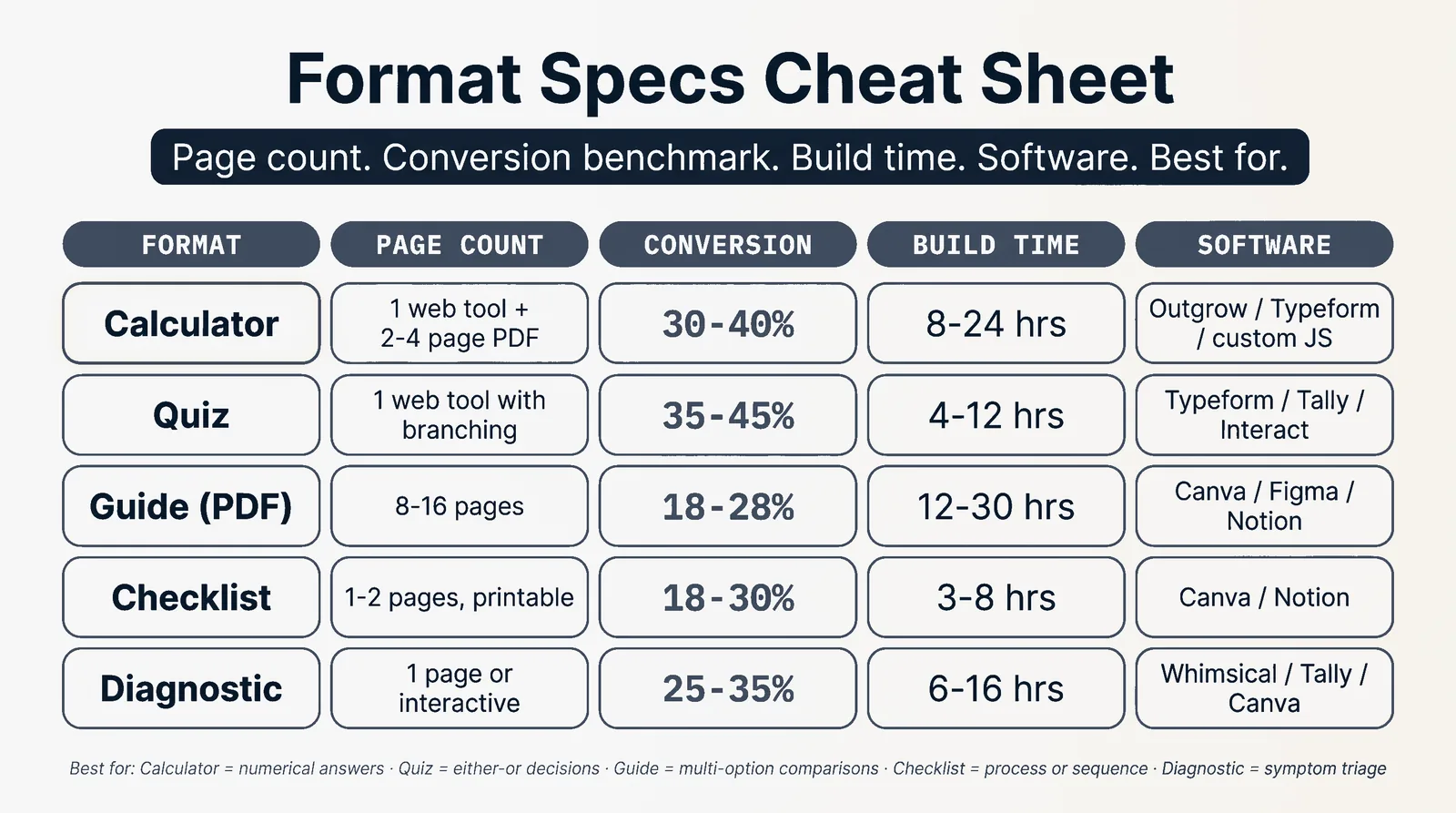
Calculator. Page count: 1 (web tool, plus a 2 to 4 page PDF for the email gate). Field count: 4 to 8 inputs. Conversion benchmark: 30 to 40 percent. Build time: 8 to 24 hours on Outgrow / Typeform, 1 to 3 weeks for a custom JS widget. Software: Outgrow ($79 per month), Typeform ($25 per month), Tally (free, basic), or custom Vue / React. Best for: numerical decisions where the buyer's first question is "how much".
Quiz. Page count: 1 (web tool with branching, plus per-outcome PDF). Field count: 6 to 10 questions. Conversion benchmark: quiz completion 50 to 60 percent, email opt-in among completers 35 to 45 percent. Build time: 4 to 12 hours. Software: Typeform, Tally, Interact, Outgrow. Best for: either-or decisions and segmentation. Quizzes also pre-qualify buyers, so the leads are warmer.
Guide (PDF). Page count: 8 to 16 pages. Field count: email + first name max. Conversion benchmark: 18 to 28 percent. Build time: 12 to 30 hours including design. Software: Canva, Figma, or Notion + PDF export. Best for: comparison content, hidden-cost reveals, deeper "how the industry actually works" pieces.
Checklist. Page count: 1 to 2 pages, printable. Field count: email only. Conversion benchmark: 18 to 30 percent. Build time: 3 to 8 hours. Software: Canva or Notion. Best for: pre-project prep, vendor vetting, anything the buyer wants to print and check off.
Diagnostic. Page count: 1 (decision tree on a single page or interactive flowchart on the web). Field count: email at the leaf-outcome stage. Conversion benchmark: 25 to 35 percent. Build time: 6 to 16 hours including the decision-logic mapping. Software: Canva for static, Whimsical or Lucidchart for design, Tally or custom JS for interactive. Best for: troubleshooting flows and buyer confidence ("am I overreacting or do I need to call?").
Keep this cheat sheet open while you score the ideas in Part 3 Step 4. The build-time estimates are honest and reflect what it actually takes when you've done it before. First time through any of these, double the estimate.
Part 5: The Local-SEO Multiplication Layer
Here's where it gets compounding. One lead magnet can become 12 to 50 lead magnets if you spin it across your service-area pages with zip-customized data.
The play looks like this. You build one master HVAC repair cost calculator. Then you create a service-area landing page for every city or neighborhood you serve, and on each page you embed the same calculator but pre-populated with that city's average pricing data and zip code.
So your one calculator becomes:
- /hvac-repair-cost-calculator-austin-tx
- /hvac-repair-cost-calculator-round-rock-tx
- /hvac-repair-cost-calculator-pflugerville-tx
- /hvac-repair-cost-calculator-cedar-park-tx
- /hvac-repair-cost-calculator-georgetown-tx
You're now ranking for 5 long-tail city-specific queries instead of one generic query. Each page captures email opt-ins from the same calculator and feeds the same CRM. The build cost was incremental (one template, swap the city variable, swap the average pricing).
The naming convention.
Pick one and stick to it across your whole site. The two that work:
- /[service-keyword]-[modifier]-[city]-[state]
- /[city]-[state]/[service-keyword]-[modifier]
The first version is better for ranking, the second for site organization. Pick one.
The technical implementation.
Three options.
Option A: hand-build pages. Use a template, duplicate it per city, swap variables. Slow but works for 5 to 10 cities. Stops scaling past 15.
Option B: programmatic SEO. Use Webflow CMS, WordPress with a custom post type, or Next.js with dynamic routes pulling from a city database. One template, one row per city, hundreds of pages. The standard for any serious local operator.
Option C: a content layer on top of a Webflow / Framer site. Tools like Letterdrop or BetterStack for SEO content generation, with manual review.
For a 5 to 15 city footprint, Option A is fine. For 20 plus cities, Option B is mandatory.
The math.
Say your calculator captures 30 leads per month from one generic landing page. Spin it across 12 service-area pages, each capturing 8 to 12 leads per month from city-specific traffic, and you're at 100 to 150 leads per month from the same magnet. Same build effort, 4x the lead flow.
Watch-outs.
Don't just swap the city name and call it done. Each page needs at least 300 words of city-specific content (neighborhoods served, average project pricing in that market, local permit notes if relevant) or Google treats them as duplicate content and de-indexes the lot.
Add LocalBusiness schema with the city's coordinates if you have a physical location there. If you don't (you serve the city but operate from elsewhere), use Service schema with areaServed.
Part 6: Distribution: Where to Place These
You've built the magnet. Now you need to put it in front of buyers. Six channels that work for home service, with conversion benchmarks per channel.
Homepage hero CTA. Your strongest converting placement. Put the magnet's value prop in the hero section above the fold with a single email field. Conversion: 4 to 8 percent of homepage visitors.
Exit-intent popup. Triggered when the cursor moves toward the browser back button or tab close. Offers the magnet as a "before you go" gift. Less obtrusive than scroll-triggered popups. Conversion: 2 to 5 percent of exits captured.
Blog post sidebar / inline CTA. Embedded inside a related blog post. The cost calculator goes inside "How much does a roof replacement cost in 2026". Conversion: 6 to 12 percent of post readers when the magnet matches the post intent.
Google Ads landing page. Build a single-purpose landing page for paid traffic. Magnet is the only CTA. No site nav. Conversion: 12 to 25 percent (way higher than organic placements because the traffic is intent-matched). Also lowers your CPL because Google rewards pages with high engagement.
Facebook ad creative. The magnet itself becomes the ad. "Free: HVAC Cost Calculator. Get your range in 90 seconds." Direct to the landing page or a Facebook lead form. Conversion: 8 to 15 percent of clicks. Watch CPL closely; Facebook for home service runs $15 to $40 per qualified lead depending on market.
Google Business Profile posts. Often-skipped channel. Post the magnet weekly as a GBP update with the landing page link. Captures buyers who found your GBP from a near-me search. Conversion: low volume but high intent (3 to 8 percent of post clicks).
Neighborhood Facebook groups. Played carefully. Don't spam. When someone asks "anyone know a good HVAC company?", reply with helpful advice and casually mention your free calculator. The mods will ban you if it reads as advertising. The mods will love you if it reads as service.
Per-channel benchmarks. Email captures-to-customer conversion runs 5 to 15 percent in home service depending on follow-up sequence quality. So 100 emails per month from the calculator = 5 to 15 booked jobs. At an average ticket of $8,000 to $12,000, that's $40,000 to $180,000 in monthly revenue from one magnet on one channel.
Part 7: The 6-Week Launch Plan
Six weeks from "I should do lead magnets" to "I'm capturing 100 leads a month from this".
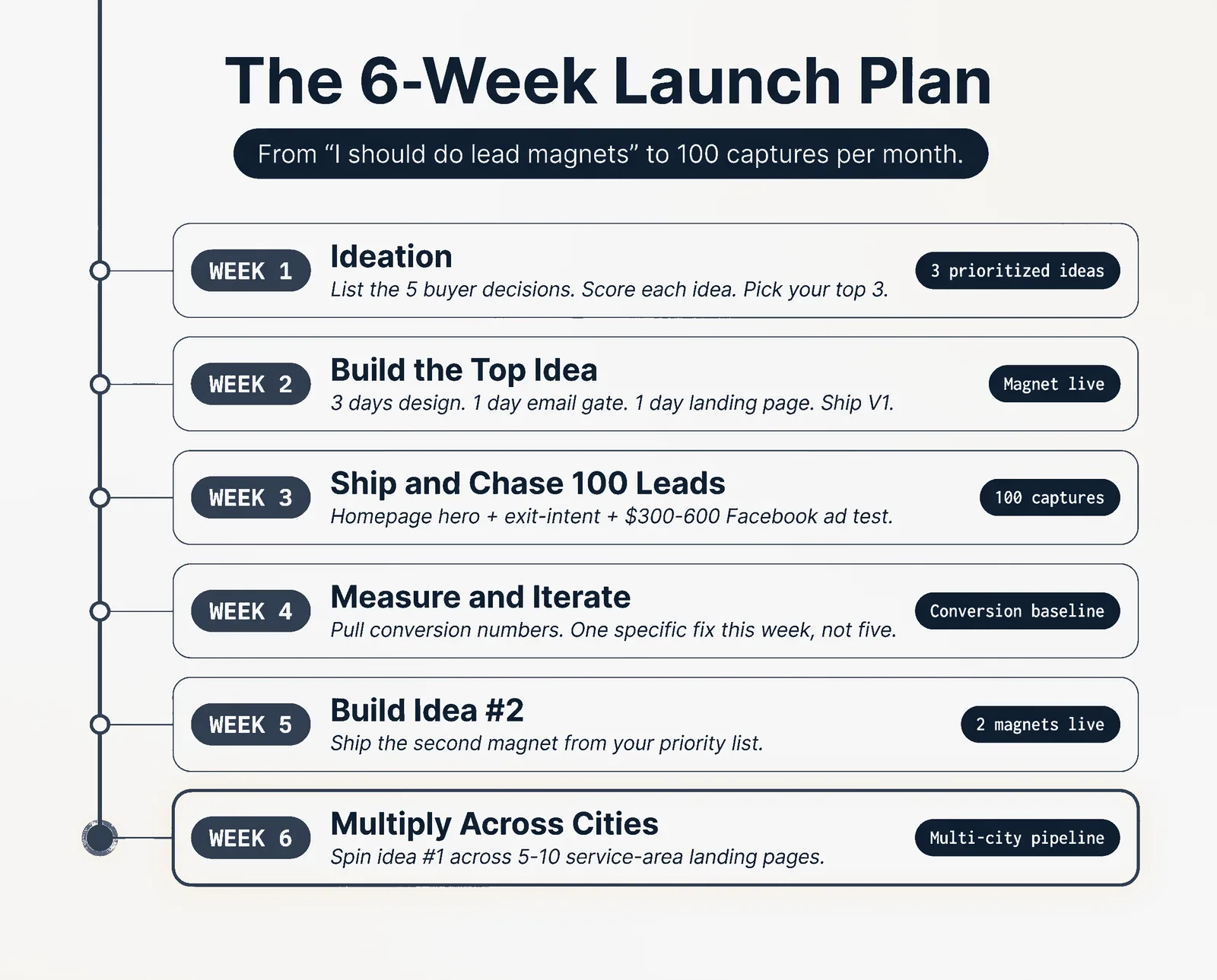
Week 1: Ideation. Use the template from Part 3. List the 5 buyer decisions, score each idea, pick your top 3. Don't start building yet. Spend the full week getting your idea list right because building the wrong magnet costs 3 weeks of work.
Week 2: Build the top idea. Pick the highest-scoring magnet and ship it. Block 3 days for design, 1 day for the email gate setup (ConvertKit, Mailchimp, ActiveCampaign), 1 day for the landing page. Use the format spec from Part 4 to scope realistically. Ship a working V1; do not perfect.
Week 3: Ship and chase your first 100 leads. Place the magnet on your homepage hero, in your top 3 service pages, and as an exit-intent popup. Run a $300 to $600 Facebook ad test to a single audience (people in your service area, age 35 plus, homeowner targeting where available). Send a "we just shipped this" email to your existing list. The goal is 100 emails captured in 7 days so you have real data.
Week 4: Measure conversion and iterate. Pull the numbers. Calculator-starts vs email-captures. Email-captures vs scheduled estimates. If completion is below 30 percent, your inputs are too long or the value prop on the landing page is weak. If estimates per capture is below 10 percent, your follow-up email sequence needs work. Make one specific fix per week, not five at once.
Weeks 5 and 6: Multiply. Build idea #2 from your priority list. Then take idea #1 and spin it across 5 to 10 service-area landing pages using the local-SEO multiplication layer from Part 5. By the end of week 6 you should have 2 magnets live, one of them spread across multiple cities, and a working lead capture pipeline.
After week 6, the rhythm is: build one new magnet per quarter, refresh the existing magnets with current pricing data twice a year, expand service-area pages as you grow into new markets.
Part 8: 8 Common Mistakes That Tank Home Service Lead Magnets
Eight failure patterns I see repeatedly. Avoid these and your conversion will out-perform whatever benchmark I quoted earlier.
Mistake 1: Gating with too many fields. Email plus first name plus phone number plus zip plus project type. Five fields kills conversion by 40 to 60 percent versus just email. Capture email at the magnet, capture phone later when they book the estimate.
Mistake 2: Burying the value. The magnet's headline reads "Sign up for our newsletter and get our free guide". Nobody knows what's in the guide. Headline should state the specific value: "Get your HVAC repair cost in 90 seconds" or "The 4 hidden costs in a kitchen remodel".
Mistake 3: No follow-up email sequence. They give you their email, they get the PDF, and then nothing for 6 weeks. Email 1 should arrive within 5 minutes (the magnet itself). Email 2 within 24 hours (related tip). Email 3 within 3 days (case study). Email 4 within 7 days (offer the consultation). Email 5 within 14 days (testimonial). The sequence is what converts the lead into a customer.
Mistake 4: Generic copy that ignores the local-buyer mindset. "Our team has been in business for many years and we pride ourselves on quality." Means nothing. The buyer wants to know if you serve their zip and what their project will cost. Say that.
Mistake 5: Wrong format for the decision. A 12-page PDF guide when the buyer needed a calculator. A calculator when the buyer needed a comparison. Re-read Part 3 Step 3 and match the format to the decision shape.
Mistake 6: No schema markup on the landing page. No FAQPage schema, no LocalBusiness, no Service schema with areaServed. Google can't tell what the page is about, so it doesn't rank, so the magnet only converts paid traffic. Add schema and your landing page starts pulling organic too.
Mistake 7: Asking the zip-code question and not using the answer. The buyer typed in 78704 and then your output gave them a national average price range. They know you ignored their input. Trust gone. If you ask for zip, return zip-customized data or don't ask.
Mistake 8: Requiring phone number too early. "Get your free quote" with name, email, phone, and address as required fields. The buyer is in research mode, not buy-mode. They'll bounce. Lead with the magnet (email only), capture the phone in email 4 of the sequence after you've delivered value.
Bonus mistake (Mistake 8b): No mobile QA. Roughly 70 percent of home service traffic is mobile. The calculator's submit button is hidden behind the keyboard on iOS. The PDF download link triggers a "this file may be harmful" warning on Android. The exit-intent popup on a phone is undismissable. Most operators design on a desktop, ship the magnet, and never test it on the device 7 of every 10 buyers will use. Open the magnet on your own phone before you go live. Then ask one customer to try it and watch over their shoulder.
The home service buyer in 2026 is the most-served and yet most-underserved buyer on the internet. Most operators are still running "request a quote" forms and wondering why their conversion is 1.4 percent.
Build one calculator, one diagnostic, and one comparison guide. Spin them across your service-area pages. Run the 5-email follow-up sequence. Watch your cost per booked estimate drop by half.
That's the playbook.
For the working spreadsheet of the ideation template, the email follow-up sequences for each magnet type, and the schema templates for service-area pages, head to winmassiveimpact.com
The rest of the guide is yours, free.
Enter your email to keep reading and get the PDF to keep.
No spam. One email unlocks every Massive Impact resource.
“What I find convenient is that everything is included in one package.”
The service behind this
More from the library
