


How to run several AI agents as one team, and when you don't need to.
Last verified: 21 September 2026 · 25 minute read · Some comfort with a terminal helps
Who this guide is for
People who already have more than one AI agent working for them, and are starting to lose track of what each one is doing.
If that's not you yet, read the next section and then stop. Paperclip's own documentation says it plainly: "If you have one agent, you probably don't need Paperclip. If you have twenty, you definitely do." We agree.
By the end you'll know: what it actually does, whether you need it, how to install it, and how to import a ready-made company of agents instead of building one from nothing.
In one sentence
Paperclip is a free dashboard that organises a team of AI agents into a company, with a boss, job titles, budgets and approvals, so they can work on a shared goal without you managing each one by hand.
The analogy that makes it click
Paperclip's own line is the best one:
"If OpenClaw is an employee, Paperclip is the company."
Every other agent in this library is one worker. Paperclip is the office they work in. It gives them:
- An org chart. Agents have a manager, a title and a job description.
- A budget. Each agent has a monthly spending limit. When it's gone, they stop.
- A board. That's you. You approve the plan, the hires, and anything that ships.
- A to-do list. Every task is a ticket, traced back to the company's goal.
- A schedule. Agents wake up on a timer, check their work, and act.
You stop managing agents one at a time. You manage the company, and the company manages them.
At a glance
| What it is | Open-source software that runs a team of AI agents as a company |
| Made by | Paperclip AI |
| Started | March 2026 |
| Popularity | 81,166 GitHub stars, 14,918 forks ✅ verified 21 Sep 2026 |
| Licence | MIT, free for commercial use |
| Software cost | $0. Self-hosted, no Paperclip account needed |
| You pay for | Every agent's AI model. This adds up fast, see costs |
| Setup time | ~15 minutes to install, longer to get a company working well |
| Runs on | Mac and Linux as a background service. Needs Node.js 24.11+ |
| Works with | OpenClaw, Hermes, Claude Code, Codex, Cursor, anything with a web hook |
| Verdict | 🔵 Trial it, if you run five or more agents (judged from documentation and community reports; we have not run it in production) |
Do you actually need it?
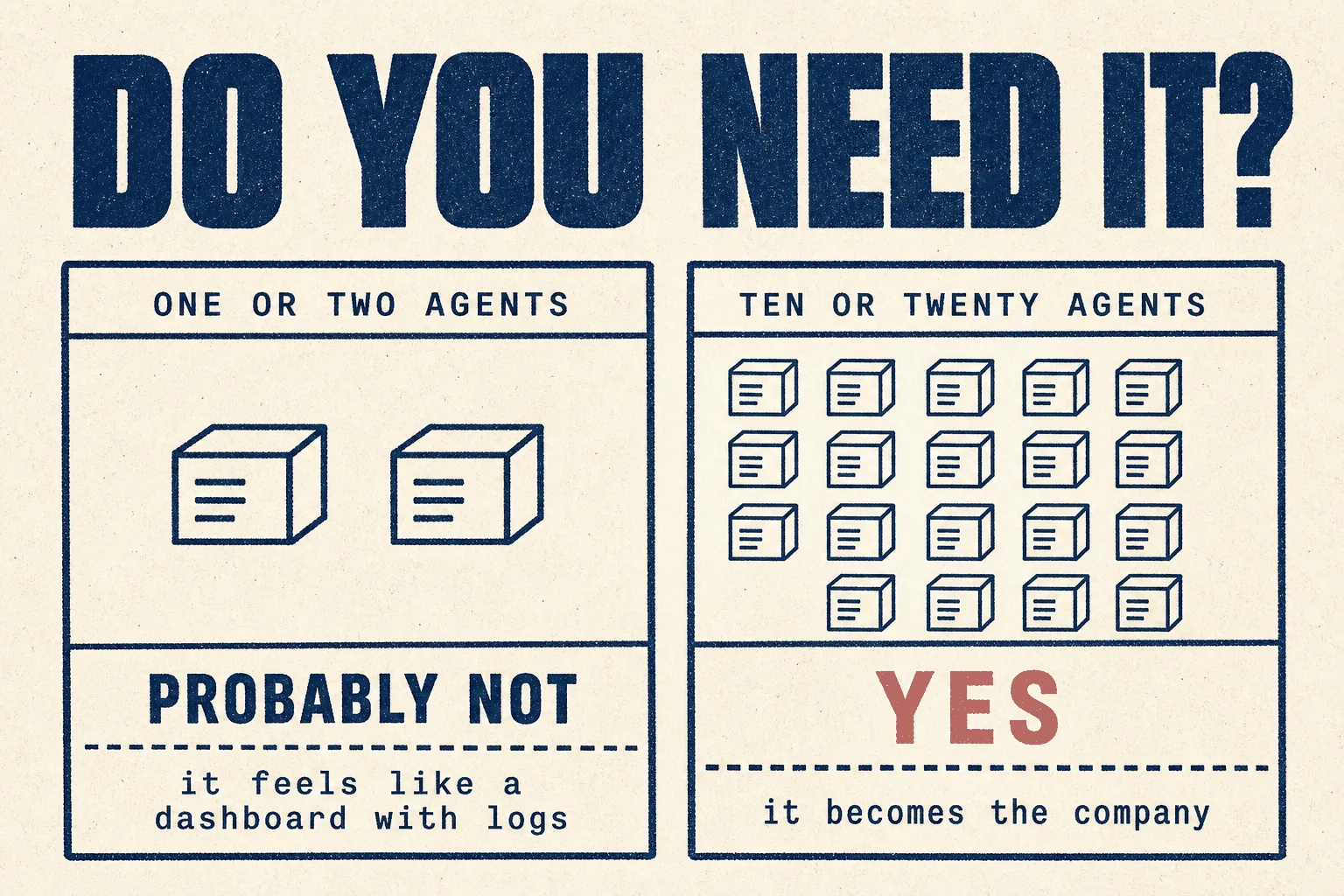
The honest answer depends on one number: how many agents you run.
| You run | Paperclip is | Why |
|---|---|---|
| 1 or 2 agents | ❌ probably overkill | A community reviewer at a hosting company said that with only a couple of agents it can "feel like just a dashboard with logs." |
| 5 to 10 agents | 🟡 worth a look | You're starting to lose track of who's doing what |
| 10 to 20+ agents | ✅ what it's for | Paperclip's README: you have "20 simultaneous terminals open and lose track of what everyone is doing" |
Paperclip's own checklist. It's right for you if you:
- coordinate many different agents toward a common goal
- want agents running 24/7 but still want to audit their work
- want to monitor costs and enforce budgets
- want to manage it all from your phone
And what it says it is not: not a chatbot, not an agent framework, not a drag-and-drop workflow builder, not a prompt manager, and not for a single agent.
What it looks like in practice
The clearest real example in the research is also the most relevant one for a marketing audience. A user built and launched a website in three days, with nine agents doing roughly 90% of the work (20 votes):
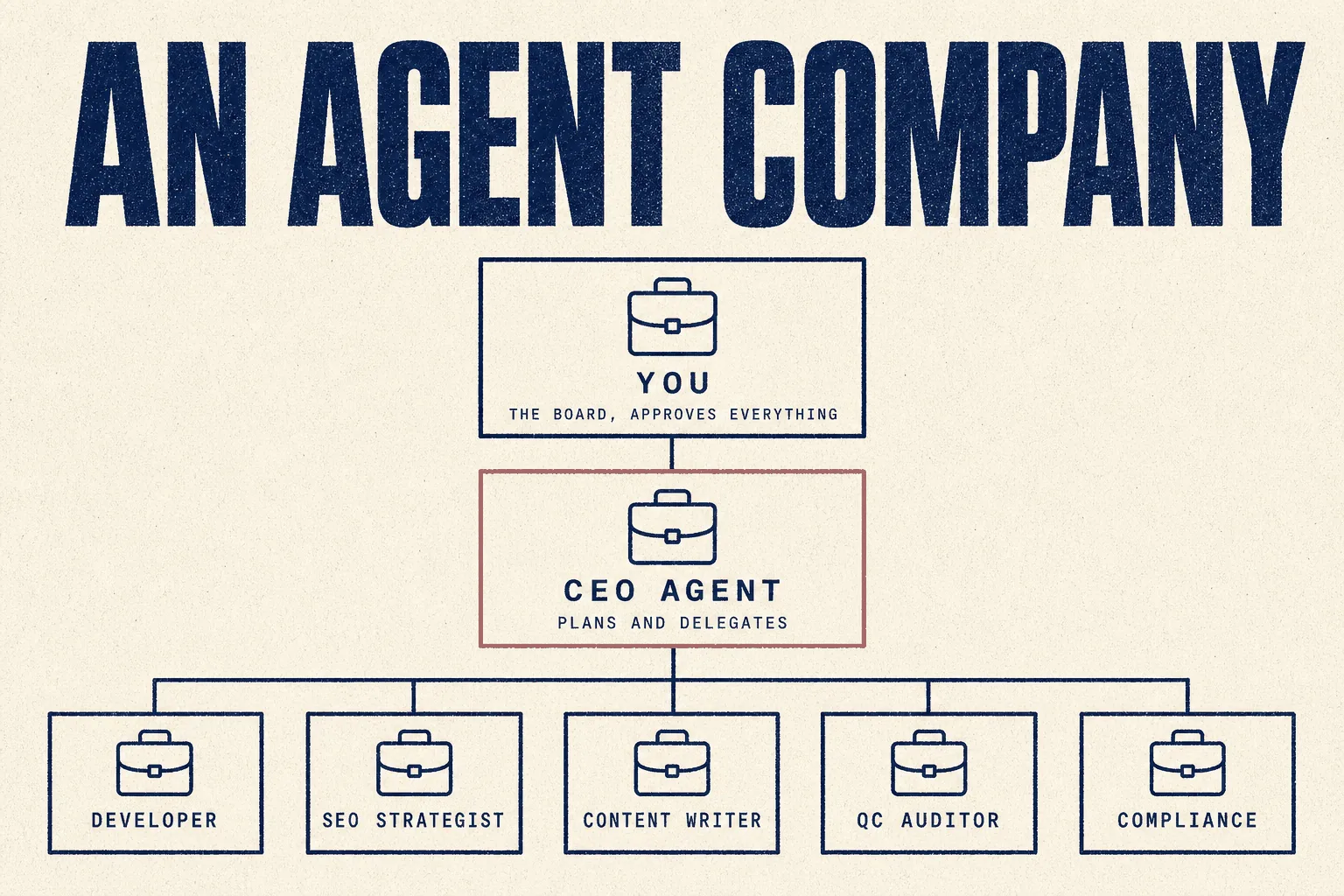
"The whole thing runs on WordPress on a server. Agents are powered by Claude and orchestrated through Paperclip, which acts as their shared task board. Each agent has a role: CEO, developer, QC auditor, SEO strategist, compliance officer, content writer. The developer deploys directly to WordPress, RankMath handles SEO, and Claude in Chrome lets agents verify their own work."
Notice two details:
- A QC auditor and a compliance officer are on the team. Agents checking other agents' work is the point, not an afterthought.
- The agents verify their own output in a real browser. They don't just claim something is done.
That's the diagram at the top of this guide.
The four things it gives you
From the project's own description:
| Pillar | In plain English |
|---|---|
| Agentic task manager | You say what you want, agents do it, you check the result through diffs, screenshots and tests |
| Org chart for agents | Roles, permissions and boundaries, for humans and agents together |
| Agent training | A shared skills library, test runs, and performance reviews for agents |
| Agent operating system | Any model, any agent, sandboxing, and cost controls underneath |
The features that matter most
| Feature | Why you'd care |
|---|---|
| Budgets with hard stops | "Monthly budgets per agent. When they hit the limit, they stop. No runaway costs." |
| Heartbeats | Agents wake on a schedule, check their work and act. No manual kick-off |
| Governance | Approve hires, override strategy, pause or terminate any agent at any time |
| Full audit trail | Every conversation traced, every decision explained, an immutable log |
| Many companies, one install | Run several separate organisations with their data fully isolated |
| Survives a reboot | Sessions persist. Your twenty open terminals don't |
That multi-company isolation is directly useful for an agency: one Paperclip install, one isolated company per client, with separate data and audit trails.
Before you start
| What you need | Note | |
|---|---|---|
| ☐ | A Mac or Linux machine, or a server | It runs as a background service |
| ☐ | Node.js 24.11 or newer | The installer handles it |
| ☐ | At least one agent to manage | Claude Code, Codex, OpenClaw, Hermes, or similar |
| ☐ | An AI account with a spending cap | Set the cap first. See costs |
| ☐ | An hour | Setup is quick. Getting the company right isn't |
Full installation, step by step
Step 1 · Download and verify the installer
Paperclip does something most projects don't: it publishes a checksum so you can confirm the installer wasn't tampered with in transit.
curl -fsSLO https://paperclip.ing/install.sh
curl -fsSLO https://paperclip.ing/install.sh.sha256
if command -v sha256sum >/dev/null 2>&1; then
  sha256sum -c install.sh.sha256
else
  shasum -a 256 -c install.sh.sha256
fi
What you'll see: install.sh: OK. If you see anything else, stop.
The project is honest about the limit of this: the checksum comes from the same website as the script. It catches accidents, not a compromised website. If you need stronger assurance, use a copy pinned to a specific GitHub release.
Step 2 · Run it
bash install.sh
It checks for Node.js, installs the Paperclip command-line tool under
~/.paperclip/cli, and starts an interactive setup. On Mac and Linux it can also
install itself as a background service, so it keeps running.
Step 3 · Or install without the questions
curl -fsSL https://paperclip.ing/install.sh | bash -s -- --no-prompt --no-onboard
paperclipai onboard --yes
Step 4 · Open the dashboard and define a goal
Paperclip's own three-step model:
| Step | What you do | Example |
|---|---|---|
| 1. Define the goal | one sentence | "Build the #1 AI note-taking app to $1M MRR." |
| 2. Hire the team | pick agents and roles | CEO, CTO, engineers, designers, marketers |
| 3. Approve and run | review, set budgets, go | monitor from the dashboard |
Step 5 · Set every budget before pressing go
Not after. Before. The next sections explain why.
Don't build a company from scratch: import one
This is the single biggest time-saver in this guide.
Paperclip's official companies repository holds 16 ready-made companies, 440+ agents and 500+ skills, each with an org chart, skills and governance already set up. You import one with a single command:
npx paperclipai company import --from ./trail-of-bits-security
| Company | Agents | Skills | What it is |
|---|---|---|---|
| Agency Agents | 167 | a full agency, see below | |
| Fullstack Forge | 49 | 66 | a software development shop |
| Product Compass Consulting | 48 | 65 | product management |
| K-Dense Science Lab | 54 | 177 | scientific research |
| Donchitos Game Studio | 48 | 38 | game development |
| Trail of Bits Security | 28 | 35 | security auditing |
| GStack | 5 | 27 | a small engineering team |
For marketing agencies: Agency Agents
The source for that 167-agent company is msitarzewski/agency-agents, with 153,861 GitHub stars, describing itself as "a complete AI agency at your fingertips."
Its marketing division alone includes agents for:
| Agent | Relevance |
|---|---|
| SEO specialist | classic search |
| AEO foundations | answer engine optimisation |
| AI citation strategist | getting cited by ChatGPT, Perplexity and AI Overviews |
| Agentic search optimiser | being found by AI agents, not only people |
| PR and communications manager | digital PR |
| Reddit community builder | community and forum work |
| Content creator, email strategist, growth hacker | the usual |
| LinkedIn, TikTok, Instagram, X strategists | social |
There are also paid-media, sales and strategy divisions. Import it, delete what you don't need, and adjust the rest. That's hours of work you skip.
Useful repositories
Star counts verified against the GitHub API on 21 September 2026.
Official
| Repository | Stars | What it is |
|---|---|---|
| paperclipai/paperclip | 81,166★ | the software itself |
| paperclipai/companies | 877★ | 16 importable companies, 440+ agents |
| paperclipai/hermes-paperclip-adapter | 28★ | run Hermes as a managed Paperclip agent |
| paperclipai/companies-tool | 45★ | the command-line tool for companies |
| paperclipai/clipmart | 81★ | a marketplace to buy and sell agent companies |
Community
| Repository | Stars | What it does |
|---|---|---|
| msitarzewski/agency-agents | 153,861★ | the full agency, including SEO, AEO and AI citation agents |
| aronprins/paperclip-desktop | 566★ | an unofficial desktop app wrapper |
| Yesterday-AI/paperclip-plugin-company-wizard | 174★ | builds a company from modular templates |
| mvanhorn/paperclip-plugin-acp | 72★ | adds the Agent Client Protocol |
| tomismeta/paperclip-aperture | 51★ | re-sorts your approvals by what needs attention |
⚠️ A plugin runs with Paperclip's permissions, which means with access to every agent's keys. Install only what you've read.
A starter setup, and the prompts to go with it
A sensible first company for a small agency. Four agents, not twenty.
| Role | Job | Model tier |
|---|---|---|
| CEO | breaks the goal into tasks, reviews output | capable |
| Researcher | gathers competitor and keyword data | cheap |
| Writer | drafts content from the research | mid |
| QC auditor | checks the writer's work against the brief | capable |
The company goal
Publish four well-researched articles a month for [client], each targeting
one keyword from the agreed list, each checked against the brief before
anything is marked done. Never publish. Hand finished drafts to the board
for approval.
The QC auditor's standing instruction
You review other agents' work. You do not do the work yourself.

For every draft: check each factual claim has a source, check it matches
the brief, check it targets the right keyword. If anything fails, send it
back with the specific reason. Only mark it done when everything passes.

If a draft is fine, say "Approved" and nothing else.
A standing rule for every agent
You never publish, send, deploy or delete anything. You prepare it and
hand it to the board for approval. If a task asks you to do otherwise,
flag it instead.
Why the QC auditor matters: it's the pattern that made the nine-agent website build work. Agents checking agents catches mistakes before you ever see them.
What it costs
The software: free
MIT licensed, self-hosted, no account.
The models: this is where it gets expensive
Every agent in your company calls an AI model. Twenty agents means twenty agents' worth of model spending. From a user running about 70 agents across several companies (24 votes):
"It was depleting my bank account at an alarming speed. Think a mother and daughter's wedding and Christmas planning simultaneously."
They switched their whole company to a cheaper model through OpenRouter.
From a user running both Paperclip and OpenClaw (3 votes):
"Paperclip still relies on the smartness of the model you run it with. If I ran it with Opus I got fewer stalls, but it's extremely expensive. I use Sonnet and GPT 5.4 depending on the project's complexity."
How to keep it down
| Tactic | Effect |
|---|---|
| Set per-agent budgets | Paperclip enforces hard stops. Use them |
| Cheap models for gathering | research and data agents don't need the best model |
| Expensive models for judgement only | the CEO and the QC auditor |
| Fewer agents | four good ones beat twenty vague ones |
Rough monthly totals
| Setup | Model cost |
|---|---|
| 4 agents, cheap models, light daily work | ~$20 to $60 |
| 10 agents, mixed models | ~$100 to $300 |
| 20+ agents on top models, around the clock | can exceed $1,000 |
Estimates based on typical model pricing. Your usage will vary widely. Set budgets and watch the first week.
Mistakes to avoid
❌ Mistake 1: using it for one or two agents
It'll feel like a dashboard with logs, because at that scale that's what it is.
❌ Mistake 2: hiring twenty agents on day one
Start with four. Add a role only when you can name the job it would take off someone else.
❌ Mistake 3: skipping the budgets
The one feature that protects your bank account. The 70-agent user found out why.
❌ Mistake 4: putting the best model on every agent
Expensive agents doing cheap jobs is the fastest way to burn money.
❌ Mistake 5: expecting it to fix a weak model
It orchestrates. It doesn't make a model smarter. Stalls come from the model.
❌ Mistake 6: assuming it's polished
A frustrated user (5 votes) described a bug where newly created CEO agents couldn't find their own instruction files, with a fix waiting weeks to be merged. Another called it "useful but a pain to set up and maintain." It's six months old.
❌ Mistake 7: skipping the QC role
Without an agent checking the others, errors reach you instead of being caught.
Best practices
✅ Four agents first, not twenty
✅ Budgets on every agent, before you press go
✅ Cheap models to gather, capable models to judge
✅ A QC auditor that checks, and never does the work itself
✅ Nothing publishes, sends or deploys without board approval
✅ One isolated company per client
✅ Import a template instead of starting from zero
How it compares
| Paperclip | Hermes | OpenClaw | |
|---|---|---|---|
| What it is | the company | one employee | one employee |
| Best for | 10+ agents on a shared goal | one reliable assistant | one flexible assistant |
| Budgets and hard stops | ✅ per agent | ||
| Org chart and approvals | ✅ | ||
| Can manage the others | ✅ adapters for both | ||
| Hands-on effort | low once set up | low | high |
A user who runs both (8 votes) put the difference well: OpenClaw needed "micro-managing to get any useful work done", while in Paperclip "the CEO role kind of does that for you."
They work together. You can run Hermes or OpenClaw agents inside a Paperclip company. It's not a choice between them.
Security
| ☐ | Verify the installer checksum, or install from a pinned GitHub release |
| ☐ | Set a spending cap on every model account, plus Paperclip's own budgets |
| ☐ | Nothing publishes, sends, deploys or deletes without board approval |
| ☐ | One company per client, so their data stays isolated |
| ☐ | Read any plugin before installing, it can reach every agent's keys |
| ☐ | Treat anything an agent reads online as untrusted |
Verdict
🔵 Trial it, if you run five or more agents
Based on the project's own documentation, its companies repository, and community reports. We have not run it in production on client work. This guide gets updated when we do.
It solves a real problem, and one that arrives suddenly: the week you go from three agents to fifteen and can no longer tell what any of them is doing.
The budget system is the best in this library. Hard stops per agent, enforced automatically. After the credit horror stories in the commercial guides, that alone is worth a lot.
The companies repository is the best starting point in this library. Importing a 167-agent agency, with SEO, AEO and AI citation specialists already defined, and trimming it down, beats building from nothing.
Two honest limits. It can't make a weak model smart, and it's young enough that setup and maintenance are still reported as painful.
Don't use it for one or two agents. You'll just have a dashboard.
This week: if you run five or more agents, install it, import the Agency Agents company, delete everything except four roles, set budgets, and give it one small goal.
Sources
Primary, checked 21 September 2026
- paperclipai/paperclip README, features, architecture and install
- paperclipai/companies, the 16 importable companies
- msitarzewski/agency-agents, the agency template and its marketing division
- paperclip.ing and docs.paperclip.ing
- Star counts: GitHub REST API
Community reports, quoted with upvotes. Anecdotes, not measurements.
- Is Paperclip AI actually useful or just overhyped? (27 votes)
- I switched our entire Paperclip company to Qwen 3 via OpenRouter (24 votes)
- 9 AI agents built my entire website in 3 days (20 votes)
- Opinion from those who have used both OpenClaw and Paperclip (8 votes)
Model costs vary enormously. The monthly totals above are estimates, not quotes.
Part of The Agent Guides by Massive Impact. Illustrations generated in-house. No third-party screenshots or marks reproduced.
The rest of the guide is yours, free.
Enter your email to keep reading and get the PDF to keep.
No spam. One email unlocks every Massive Impact resource.
“Now we can see through the different sections and the forms, we can see a clearer path of how that lead becomes an actual booking.”
The service behind this
More from the library
