



An OpenClaw-style assistant built from n8n workflows, and when rails beat roads.
Last verified: 21 September 2026 · 18 minute read · For people who already use, or want to use, n8n
Who this guide is for
People who like n8n, the visual automation tool where you connect boxes to build a workflow, and want an OpenClaw-style assistant built the same way.
It's also for anyone deciding between workflows (predictable steps) and agents (that figure things out), because that's the real question underneath this guide.
By the end you'll know: what n8n-claw is, how to install it with one script, the licensing detail agencies need to check, and the pattern that makes n8n and agents work well together.
In one sentence
n8n-claw is an OpenClaw-style AI assistant built entirely inside n8n, so you can see and edit every step it takes as a visual workflow.
The analogy that makes it click
There are two ways to automate work.
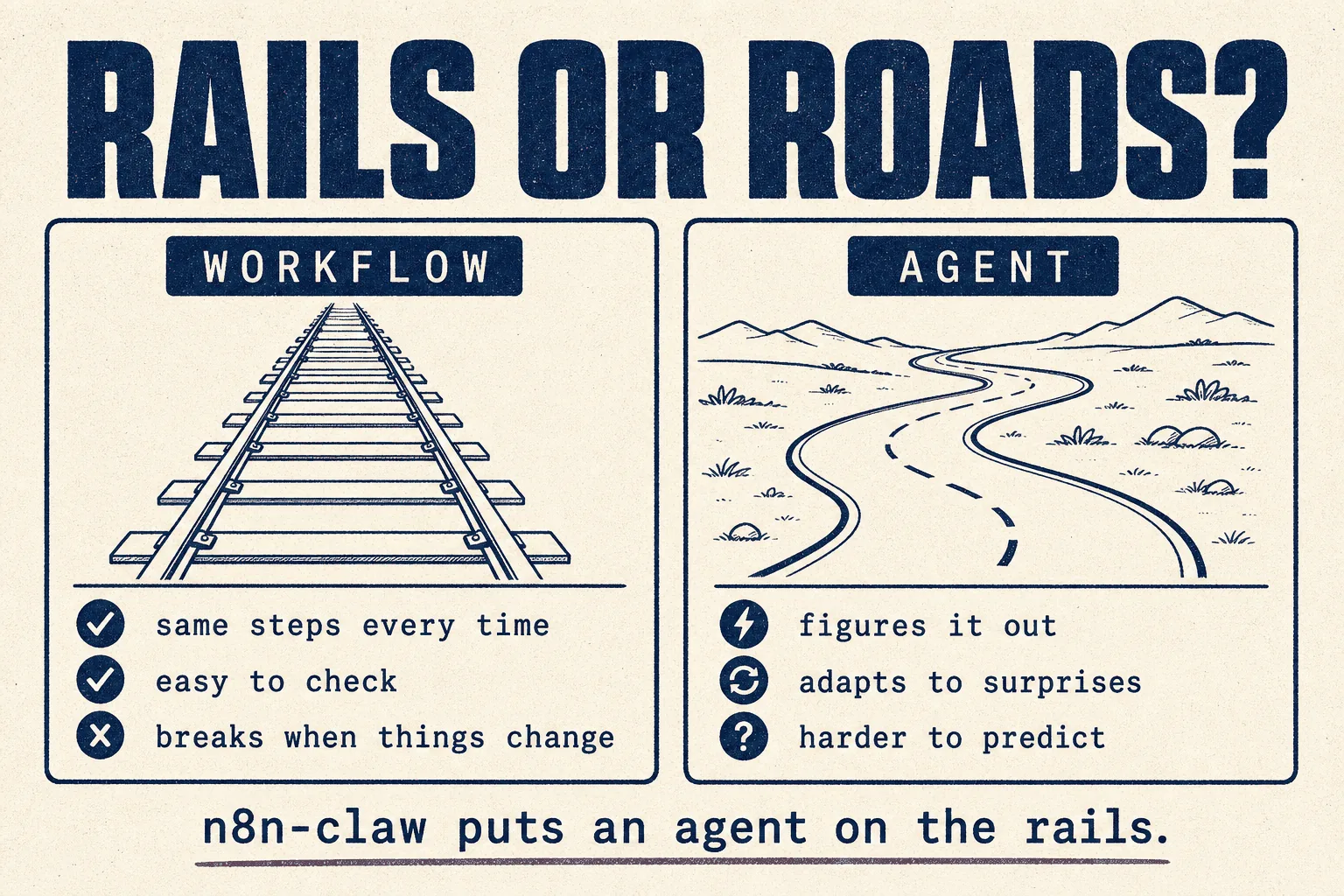
A workflow is a train on rails. Same route every time, easy to check, completely predictable. But if something unexpected is on the track, it stops.
An agent is a driver on open roads. It adapts, finds a way round, handles surprises. But you can't always predict the route it'll take.
n8n-claw puts an agent on the rails. The assistant thinks like an agent, but everything it does runs as n8n workflows you can open, inspect and change.
A community member summed up the trade (14 votes):
"n8n is more deterministic. OpenClaw is a free-for-all. If you need granular control of your agents and workflows, n8n is probably the better choice."
At a glance
| What it is | An OpenClaw-inspired assistant built as n8n workflows |
| Made by | Freddy Schuetz, as a community project |
| Started | February 2026 |
| Popularity | 560 GitHub stars ✅ verified 21 Sep 2026. Small, but actively maintained |
| Built on | n8n (205,542 stars), PostgreSQL, and Claude by default |
| Licence | ⚠️ No licence file. See the licensing section |
| Software cost | $0 |
| You pay for | a server (~$5/month) and your AI model's API |
| Setup time | One script, roughly 30 to 60 minutes |
| Runs on | A Linux server with 4GB RAM and 15GB disk, or locally with Docker |
| Talk to it in | Telegram by default; Slack, Teams or anything else through its web API |
| Verdict | 🟡 Watch it, unless you already live in n8n (judged from documentation and community reports; we have not run it in production) |
What it does
From the project's own feature list:
| Feature | In plain English |
|---|---|
| Long-term memory | remembers across conversations, finds people by name, prefers recent context |
| Knowledge graph | automatically tracks people, companies, products and how they connect |
| Tasks and reminders | "remind me in 2 hours to…", with priorities and due dates |
| Proactive heartbeat | nudges you about overdue or urgent tasks, every 5 minutes |
| Recurring actions | "check my email every 15 minutes", "daily briefing at 8am" |
| Silent background checks | monitoring that only notifies you when something new is found |
| Failure awareness | ask "did anything fail today?" and it explains in plain language |
| Web search | built in, no API key needed |
| Web reader | reads pages as clean text, including ones that need JavaScript |
| Browser automation | fills forms and clicks through sites, and stops to ask you for a 2FA code by Telegram |
| Expert sub-agents | three included, more in a catalogue |
| Builds its own tools | describe an integration and it builds it |
Two of those are especially good design: silent background checks (the "silent on success" habit this library keeps recommending) and asking you for the 2FA code rather than trying to get around it.
⚠️ Licensing: read this if you'll use it for clients
Two separate licences are involved, and both matter commercially.
1 · n8n-claw has no licence file
We checked the repository directly. There's no licence, and none is mentioned in the README. Under standard copyright, no licence means all rights are reserved by the author. Personal experimentation is one thing. Building a paid service on it without the author's permission is another.
If you'd use it commercially, ask the author first. It's a friendly community project, so that's likely a short conversation.
2 · n8n itself is "fair-code", not standard open source
n8n's own licence, the Sustainable Use License, says:
"You may use or modify the software only for your own internal business purposes or for non-commercial or personal use. You may distribute the software or provide it to others only if you do so free of charge for non-commercial purposes."
What that means for an agency: running n8n for your own agency's work is clearly allowed. Providing n8n to clients as a paid service is restricted. If your plan involves clients, read the full licence and n8n's own guidance before you build.
Before you start
| What you need | How to get it | |
|---|---|---|
| ☐ | A Linux server | Ubuntu 22.04 or 24.04 recommended, 4GB RAM, 15GB disk. About $5/month |
| ☐ | A Telegram bot token | message @BotFather in Telegram, send /newbot, copy the token |
| ☐ | Your Telegram chat ID | message @userinfobot; it replies with your number |
| ☐ | An AI API key | Anthropic by default; OpenAI, OpenRouter, DeepSeek, Gemini, Mistral, or local Ollama also work |
| ☐ | A domain name | needed for Telegram. No domain? The project suggests sslip.io, which turns your server's address into one |
Note: it uses an API key, not a consumer subscription, so the Claude subscription policy changes covered in other guides don't affect it.
Full installation, step by step
Step 1 · Clone and run the setup script
git clone https://github.com/freddy-schuetz/n8n-claw.git && cd n8n-claw && ./setup.sh
Step 2 · Answer the setup questions
The script asks for:
- your n8n API key, which you generate in the n8n screen that opens during setup, under Settings → API
- your Telegram bot token and chat ID
- your AI provider and key
- your domain name, which also sets up HTTPS automatically
- your assistant's personality: name, language, style
It then installs Docker, the database, credentials and workflows, and switches everything on.
Step 3 · Two optional extras
- Embeddings, for searching memory by meaning rather than keywords
- Voice messages, which need an OpenAI key for transcription
Skip both and it still works.
Step 4 · Say hello
Message your Telegram bot. That's it.
Prefer running it on your own computer?
The project includes a local setup guide using Docker and ngrok.
Connecting other apps
It has a web API, so Slack, Teams or your own software can talk to it:
curl -X POST https://YOUR-DOMAIN/webhook/agent \
  -H "Content-Type: application/json" \
  -H "X-API-Key: YOUR_WEBHOOK_SECRET" \
  -d '{"message": "Hello!", "user_id": "test-user"}'
Your first hour: three scenarios
Scenario A · A morning briefing
Every weekday at 8am, send me a briefing: my tasks due today, anything
overdue, and [two news sources]. Keep it under 150 words.
Scenario B · A silent monitor
Every hour, check [a web page or inbox] for anything new about [subject].
Only message me if you find something new. Otherwise stay silent.
Scenario C · A reminder with a task
Remind me Friday at 3pm to submit the client report, and add it to my
tasks as high priority.
The best pattern: n8n as the guard rail
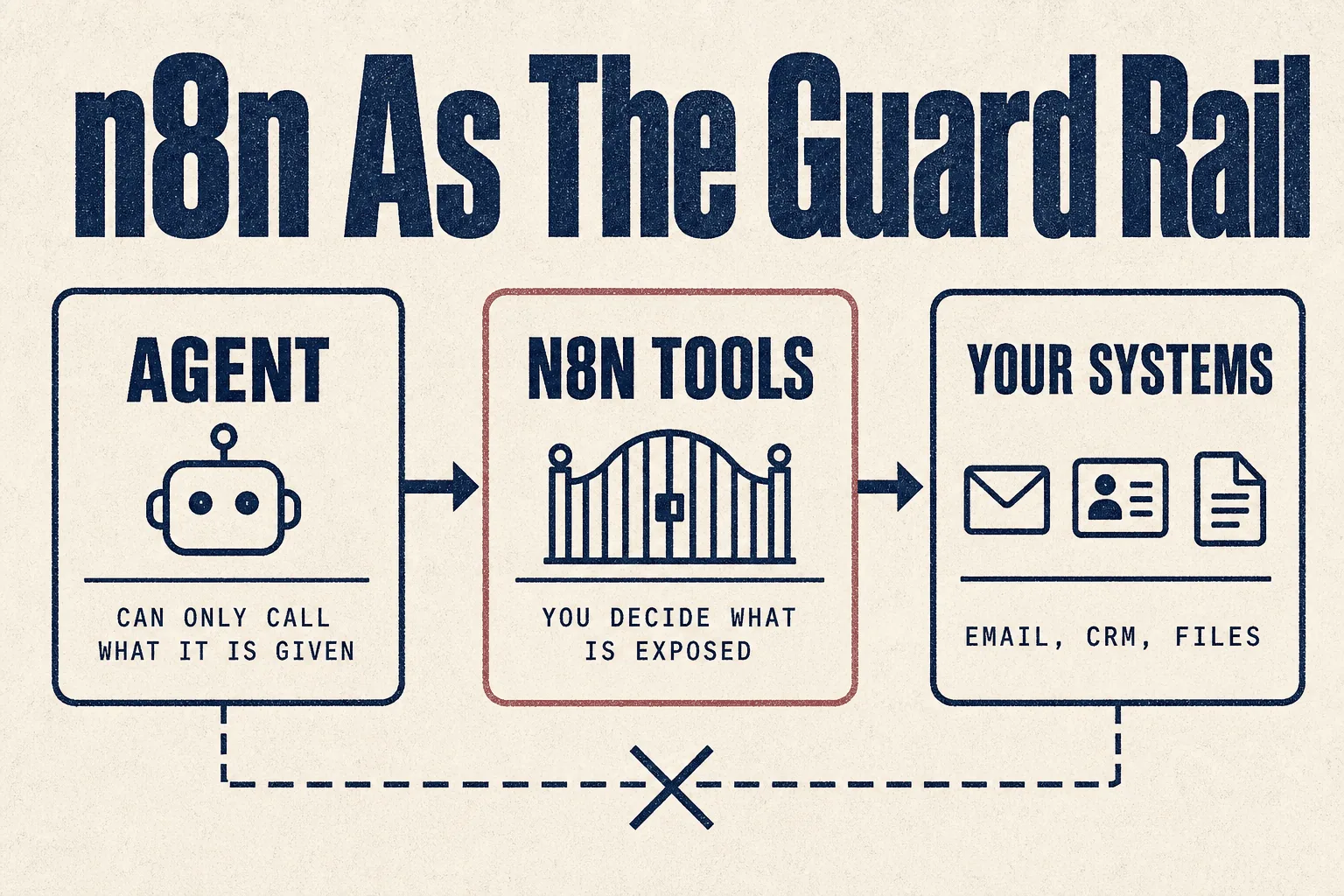
You don't have to choose between workflows and agents. The most useful idea in the community research combines them (6 votes):
"I use n8n to create tools that I expose to OpenClaw. I decide what tools it has access to through that layer. This way I know OpenClaw has no sensitive information, and I can also clean up content when handing it back."
How it works: the agent never touches your email, CRM or files directly. It can only call the specific n8n workflows you've built for it. Each workflow does one controlled thing, and you can see exactly what it did.
This works with any agent in this library, not just n8n-claw. For agencies it's one of the cleanest ways to let an agent near client systems.
What it costs
From a 30-day side-by-side test of the same assistant built four ways (21 votes; the author builds a competing product and says so up front):
| n8n (self-hosted) | |
|---|---|
| Setup time | about 90 minutes |
| 30-day cost | $5 server + $7 API = $12 |
| What went wrong | "It can't adapt." When Gmail changed a message format, the extraction step pulled garbled data instead of the email body |
That last point is the trade-off in one sentence. Workflows are cheap and predictable, and they break when the world changes. Agents adapt, and cost more.
Limits worth knowing
- A 5-minute limit on certain tool-triggered runs, per the project's own documentation.
- Browser sessions are lost on restart. Logged-in sessions live in memory.
- Small project. 560 stars and one main author. Actively updated, but a smaller safety net than the big projects.
- Server security is your job. The README recommends key-based SSH, no root password, and fail2ban.
Mistakes to avoid
❌ Mistake 1: building a paid client service without checking the licences
Both of them. See above.
❌ Mistake 2: choosing it if you don't already know n8n
Its advantage is being editable in n8n. If you've never used n8n, that advantage is a learning curve, and Hermes is simpler.
❌ Mistake 3: letting the agent reach systems directly
Use the guard rail pattern.
❌ Mistake 4: an unsecured server
Follow the project's SSH advice before connecting anything real.
❌ Mistake 5: expecting workflows to handle surprises
They don't. That's what the agent layer is for.
Best practices
✅ Check both licences before any commercial use
✅ n8n as the guard rail between agents and real systems
✅ Silent background checks, loud only on change
✅ Key-based SSH and fail2ban on the server
✅ Ask it "did anything fail today?" as a daily habit
✅ Keep the workflows it builds, they're your audit trail
How it compares
| n8n-claw | OpenClaw | Hermes | |
|---|---|---|---|
| Built as | visual n8n workflows | code | code |
| Can you see every step? | ✅ in n8n | logs | logs |
| Licence | ⚠️ none, plus n8n's fair-code | MIT | MIT |
| Default channel | Telegram | 20+ | several |
| Community size | small | largest | large |
| Best for | people who already use n8n | chat-app power users | scheduled jobs |
If you run a marketing or SEO agency
| Job | Fit | Note |
|---|---|---|
| Your own agency's internal assistant | 🟢 Good | if you already use n8n |
| A guard rail layer for other agents | 🟢 Strong | the pattern above works with any agent |
| Monitoring and alerts | 🟢 Good | silent background checks |
| Paid automation service for clients | ⚠️ Check licences | n8n's licence restricts providing it to others commercially |
Verdict
🟡 Watch it, unless you already live in n8n
Based on the project's README, the n8n licence text, and community reports. We have not run it in production on client work.
If you already build in n8n, this is a thoughtful project with good instincts: silent checks, plain-language failure reports, and asking you for 2FA codes rather than working around them.
If you don't, it's a small, single-author project with no licence file, sitting on a platform whose licence restricts commercial resale. The easier assistants in this library will serve you better.
The idea worth taking regardless: use n8n as the guard rail between any agent and your real systems.
This week: if you use n8n, build one workflow that exposes a single safe action, like "look up a client's open tasks", and connect an agent to that instead of to the system itself.
Sources
Primary, checked 21 September 2026
- freddy-schuetz/n8n-claw README, features, architecture, install and limits
- Repository contents checked directly for a licence file (none present)
- n8n licence (Sustainable Use License), quoted directly
- Star counts: GitHub REST API
Community reports, quoted with upvotes. Anecdotes, not measurements.
- n8n-claw: OpenClaw in n8n (147 votes), the author's launch post
- OpenClaw vs Claude Cowork vs n8n (85 votes)
- How does n8n differ from OpenClaw in real-world use? (27 votes)
- Same agent, four platforms, 30 days (21 votes), written by a competing vendor, disclosed
Part of The Agent Guides by Massive Impact. Illustrations generated in-house. No third-party screenshots or marks reproduced.
The rest of the guide is yours, free.
Enter your email to keep reading and get the PDF to keep.
No spam. One email unlocks every Massive Impact resource.
“The analytics are set up so I can see who's been on my website, when are they on, what stage are they on. And then it's all connected to my booking system.”
The service behind this
More from the library
