



Channel selection, account architecture, keyword build sheets, Smart Bidding rules, LSA tactical guide, and compliance for SaaS, professional services, and local businesses on $500 to $5,000 monthly budgets.
Who this is for
Solo founders, in-house marketers, and agency operators running Google Ads in 2026. Budget between $15 and $200 a day. Verticals covered: B2B SaaS, prosumer SaaS, dentists, lawyers, financial advisors, HVAC and plumbing, restaurants, fitness, real estate.
This is a tactical reference, not a survey. Eight parts. Hit the part you need on the day you need it.
What is in this playbook
- Part 1, The 2026 Google Ads Reality
- Part 2, Channel Selection Decision Tree
- Part 3, Account Architecture by Budget Tier
- Part 4, Keyword Build Sheets
- Part 5, Performance Max Asset Group Recipe
- Part 6, Smart Bidding Decision Tree
- Part 7, LSA Tactical Guide (post-October 2025 overhaul)
- Part 8, Funnel Math, Compliance, Checklists, Failures
Part 1, The 2026 Google Ads Reality
The Google Ads stack today does not look like the 2024 version. AI Max replaced Dynamic Search Ads. Performance Max finally got the Channel Performance Timeline that operators have been demanding for two years. Demand Gen replaced Discovery Ads. The Google Guaranteed and Google Screened badges retired on October 20, 2025 in favor of the unified Google Verified blue checkmark, and reviews moved entirely to Google Business Profile.
If you only have time to read one section before launching, read this one.
The shifts that changed what you ship
| Shift | Date | What it means for your account |
|---|---|---|
| AI Max replaces DSA | Q1 2026 | New keyword expansion layer. Tighter negative-keyword discipline required. |
| PMax Channel Performance Timeline | April 2026 | Finally see Search vs YouTube vs Display contribution over time. Negative keyword cap raised to 10,000. |
| Customer-list exclusions native in PMax | Q1 2026 | Suppress existing customers natively, no audience workarounds |
| Demand Gen replaces Discovery Ads | March 2024 (full sunset 2025) | Shoppable CTV, Travel Feeds, audience signal slider retired March 15, 2026 |
| LSA badge unification | October 20, 2025 | Google Guaranteed + Google Screened gone. New Google Verified blue checkmark. |
| LSA reviews move to GBP | July 11, 2025 | Reviews now flow through Google Business Profile only |
| Call-only ads sunsetting | Q4 2026 (full sunset Feb 2027) | Replacement is RSA with call assets |
| Smart Bidding maturity | Q1 2026 data | tROAS users hit 38% higher ROAS than Manual CPC. tCPA delivers 24% lower CPA after 6-week learning. |
What stays the same
- Branded search defense first. Always own your brand SERP.
- Conversion tracking + Enhanced Conversions + offline conversion imports is still the durability layer.
- Quality Score still depends on CTR, ad relevance, and landing page experience.
The rest of the Massive Impact library builds on patterns like this. See the full set at the Massive Impact resource library.
Part 2, Channel Selection Decision Tree
The fastest way to waste money in Google Ads in 2026 is to launch every campaign type at once on a small budget. Pick the right two or three channels for your vertical and budget. Skip the rest.
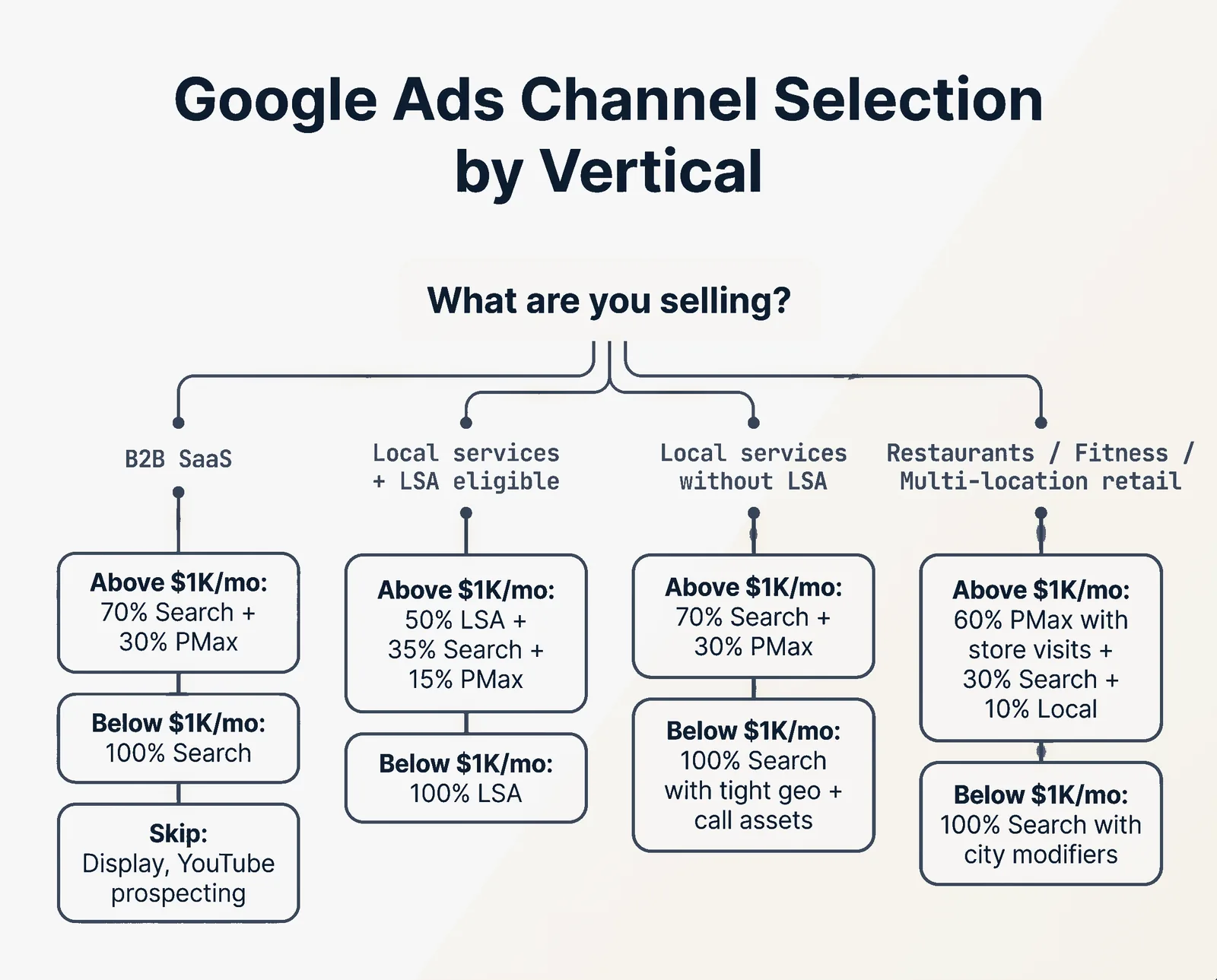
The decision tree
What are you selling?
│
├── B2B SaaS
│   ├── Above $1K/mo: 70% Search (brand + non-brand) + 30% PMax
│   ├── Below $1K/mo: 100% Search (brand defense + 5 to 8 high-intent terms)
│   └── Skip: Display, YouTube prospecting until $5K+/mo
│
├── Local services with LSA category eligibility
│   ├── Above $1K/mo: 50% LSA + 35% Search + 15% PMax with store visits
│   ├── Below $1K/mo: 100% LSA (cheapest leads, fastest to setup)
│   └── Skip: Demand Gen until LSA is saturated
│
├── Local services without LSA eligibility (most medical specialties)
│   ├── Above $1K/mo: 70% Search + 30% PMax
│   ├── Below $1K/mo: 100% Search with tight geo + call assets
│   └── Skip: Display, broad PMax
│
├── Prosumer SaaS / freemium tools
│   ├── Above $1K/mo: 50% Search + 30% PMax + 20% Demand Gen retargeting
│   ├── Below $1K/mo: 100% Search on competitor + category + alternative terms
│   └── Skip: Display, YouTube prospecting
│
└── Restaurants / fitness / multi-location retail
    ├── Above $1K/mo: 60% PMax with store visits + 30% Search + 10% Local Inventory
    ├── Below $1K/mo: 100% Search with city-name modifiers + call assets
    └── Skip: YouTube unless you have polished video assets
LSA category eligibility (US, 2026)
| Category | LSA available? | Notes |
|---|---|---|
| HVAC, plumbing, electrical | Yes | $263 to $288 average CPA, $1,700 to $2,400 average ticket |
| Lawyers (most practice areas) | Yes | $80 to $300 CPL depending on practice area |
| Dentistry | Yes | First medically-regulated category permitted |
| Most other healthcare | No | Excluded as of 2026 |
| Financial advisors, accountants | Yes | Strong fit for high-trust verticals |
| Cleaners, movers, fitness trainers | Yes | Standard LSA optimization rules apply |
| Real estate | Yes (limited) | LSA Real Estate available in select metros |
| Restaurants | No | Use Local campaigns or PMax with store visits |
This pattern is one piece of a wider toolkit. Adjacent playbooks at the Massive Impact resource library.
Part 3, Account Architecture by Budget Tier
The single most expensive mistake at small-budget scale is fragmenting one $500/mo budget across six campaign types. Smart Bidding learns nothing when each campaign sees fewer than 30 conversions a month.
The conversion-data floor
Smart Bidding needs a minimum data signal to deploy:
| Bid strategy | Minimum conversions | When to deploy |
|---|---|---|
| Maximize Conversions | 0 | New campaigns, no historical data |
| Manual CPC | 0 | Campaigns under 30 conv/30 days |
| tCPA (Target CPA) | 30 in 30 days | Lead gen, services, demos |
| tROAS (Target ROAS) | 50 in 30 days, value tracked | Revenue-tracked campaigns at scale |
| Maximize Conversion Value | 50 in 30 days | Ecommerce ramp |
If your account is below 30 conv/month, stay on Manual CPC. Any Smart Bidding strategy will starve.
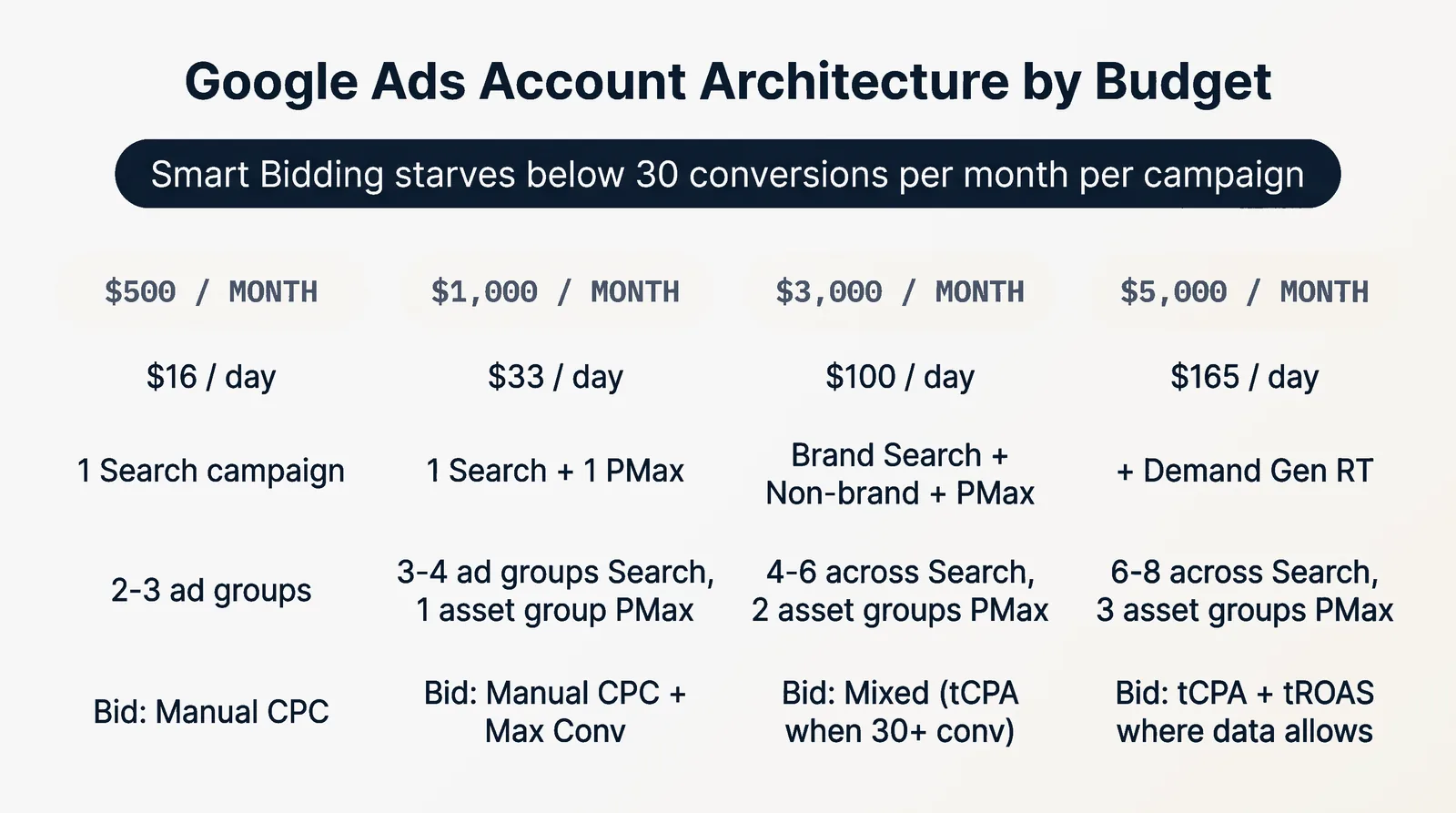
Architecture by tier
| Monthly budget | Daily budget | Campaigns | Ad groups | Bid strategy |
|---|---|---|---|---|
| $500 | $16 | 1 Search (brand + non-brand) | 2 to 3 | Manual CPC |
| $1,000 | $33 | 1 Search + 1 PMax (small) | 3 to 4 in Search, 1 asset group in PMax | Manual CPC + Max Conversions |
| $3,000 | $100 | 1 Brand Search + 1 Non-Brand Search + 1 PMax | 4 to 6 across Search, 2 asset groups in PMax | Manual CPC for Brand, tCPA for Non-Brand if 30+ conv/mo, Max Conversions for PMax |
| $5,000 | $165 | 1 Brand Search + 1 Non-Brand Search + 1 PMax + 1 Demand Gen RT | 6 to 8 across Search, 3 asset groups in PMax | Manual CPC, tCPA, Max Conversions, Max Conversions |
What each campaign does
$500 / month: one Search campaign with two ad groups (brand defense + 5 to 8 highest-intent commercial keywords). No PMax, no Display, no YouTube. Manual CPC at the start.
$1,000 / month: add a small PMax campaign with one asset group, broad audience signal, $5 to $10/day budget cap. Use it to find expansion queries and feed the Search account.
$3,000 / month: split brand and non-brand into separate campaigns (different match types, different budget allocation, different bid strategy). PMax gets two asset groups segmented by audience or product line, brand exclusions on. Move Non-Brand Search to tCPA when it clears 30 conv/mo.
$5,000 / month: add Demand Gen retargeting from website visitors and PMax converters. Customer-list exclusions on PMax to avoid waste on existing buyers.
Brand exclusions are mandatory
If you run any PMax campaign and a separate branded Search campaign, set brand exclusions on PMax. Otherwise PMax cannibalizes Search at lower Quality Scores and you pay more for the same brand traffic.
More patterns like this across the Massive Impact library at the Massive Impact resource library.
Part 4, Keyword Build Sheets
Each keyword set below is a starting seed. Add city-name and zip-code modifiers for local. Layer in negatives from day one (the negatives matter as much as the positives).
B2B SaaS
High-intent commercial seeds (Phrase + Exact match):
[CRM software for SMB]
[best CRM for small business]
[Salesforce alternative]
[HubSpot vs CRM name]
[CRM software pricing]
[CRM with email integration]
[free CRM for startups]
[CRM software comparison]
"sales pipeline software"
"deal tracking software"
"contact management software"
Negatives starter pack:
free, jobs, career, tutorial, login, download, crack, torrent, github, open source, reddit, wikipedia, history, definition, what is
Median non-brand SaaS CPC in 2026: $8.50 to $14.00. Cybersecurity and FinTech: $16 to $18.
Dentists
High-intent commercial seeds:
[dentist near me]
[emergency dentist {city}]
[dental implants {city}]
[teeth whitening {city}]
[invisalign {city}]
[pediatric dentist {city}]
[cosmetic dentist {city}]
"new patient dentist"
"dental cleaning {city}"
Negatives starter pack:
school, jobs, career, salary, license, insurance only, walmart, free, cheap, low income, government program, scholarship
Lawyers (Personal Injury example)
High-intent commercial seeds:
[personal injury lawyer {city}]
[car accident attorney near me]
[truck accident lawyer {city}]
[motorcycle accident attorney {city}]
[slip and fall lawyer {city}]
[wrongful death attorney {city}]
"PI lawyer free consultation"
"car accident lawyer no win no fee"
Negatives starter pack:
free, salary, jobs, career, school, become, law degree, paralegal, court records, lookup, public records, near me jobs
Legal CPC 2026: $5.90 to $8.58 average, can spike to $40+ on competitive Personal Injury terms in Tier 1 cities.
Home services (HVAC example)
High-intent commercial seeds:
[hvac repair {city}]
[ac repair near me]
[furnace repair {city}]
[hvac installation {city}]
[emergency hvac {city}]
[ductless mini split {city}]
"hvac maintenance plan {city}"
"hvac quote {city}"
Negatives starter pack:
diy, parts, manual, training, jobs, career, school, license, certification, used, refurbished, free
LSA average CPA HVAC: $288, average ticket: $2,433. Plumbing CPA $263, ticket $1,707.
Local restaurants
High-intent commercial seeds:
[best {cuisine} {city}]
[{cuisine} delivery {city}]
[{cuisine} restaurant near me]
[brunch near me {city}]
[lunch specials {city}]
"{cuisine} reservations {city}"
"open now {cuisine} {city}"
Negatives starter pack:
recipes, recipe, jobs, career, training, free, cheap eats only, fast food, drive thru only, gluten free (unless you serve)
CPC 2026: $1.50 to $4.
The 25 universal negatives
Add these to every account, every campaign, day one:
free, jobs, career, salary, training, school, university, course, tutorial, how to, what is, definition, history, wiki, wikipedia, reddit, quora, login, sign in, download, torrent, crack, pirate, github, manual, pdf
This list alone saves the average small advertiser 38% of wasted spend in the first 90 days.
Part 5, Performance Max Asset Group Recipe
PMax is an opaque campaign type, but the inputs are not opaque. Get the inputs right and PMax behaves predictably. Get them wrong and it dumps spend on Display and Gmail with no recovery path.
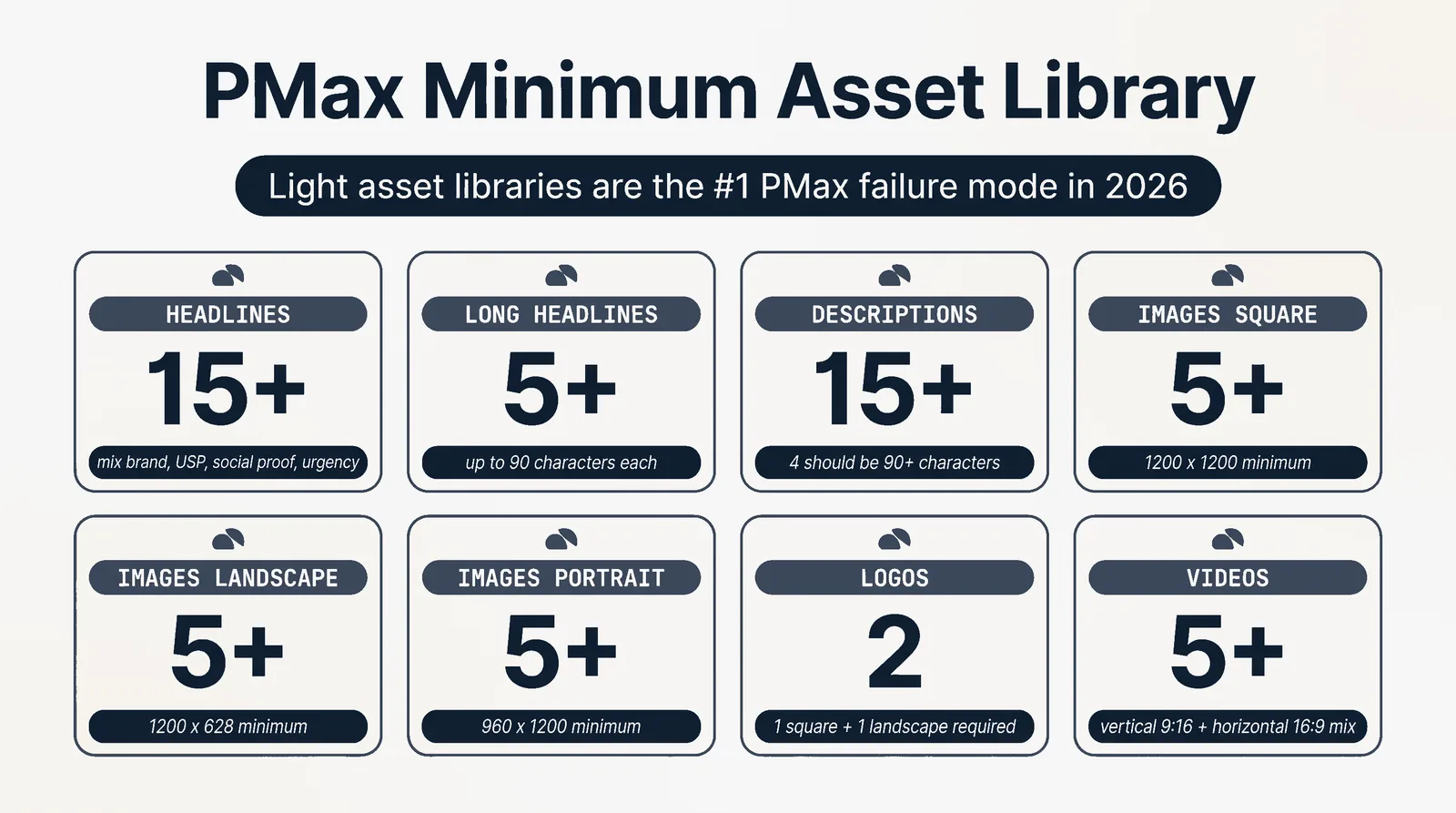
The minimum asset library
| Asset | Minimum count | Notes |
|---|---|---|
| Headlines | 15 | Mix of brand, value prop, USP, social proof, urgency |
| Long headlines | 5 | Up to 90 characters each |
| Descriptions | 15 | At least 4 should be 90+ characters |
| Images (square) | 5 | 1200 x 1200 minimum |
| Images (landscape) | 5 | 1200 x 628 minimum |
| Images (portrait) | 5 | 960 x 1200 minimum |
| Logos | 1 square + 1 landscape | Required |
| Videos | 5 | Vertical 9:16 + horizontal 16:9 mix |
Light asset libraries are the #1 PMax failure mode in 2026. Five headlines and three images give the AI nothing to optimize. Ship 15+ of every asset type or expect waste.
Asset group structure
Three to five asset groups per campaign, segmented by audience or product line, NOT by geography.
For B2B SaaS:
- Asset group 1: enterprise buyer (decision-maker copy, ROI imagery)
- Asset group 2: practitioner buyer (workflow copy, product UI imagery)
- Asset group 3: trial/freemium audience (low-friction copy, "free" imagery)
For local services:
- Asset group 1: emergency/urgent intent (24/7 copy, fast-response imagery)
- Asset group 2: scheduled/planned service (price transparency, before/after imagery)
- Asset group 3: maintenance plan upsell (recurring revenue copy)
Audience signals
Audience signals do NOT restrict targeting. They accelerate the AI's learning. Stack them.
| Signal source | Use for |
|---|---|
| Customer Match (closed-won) | Highest-quality LAL signal |
| Website visitors (90-day) | Warm audience pattern |
| Converters from other campaigns | Cross-campaign signal sharing |
| In-market segments | Category-buying intent |
| Custom segments by URL | Competitor research signal |
| Custom segments by keyword | Search intent transfer |
Settings to set day one
- URL expansion: OFF for B2B SaaS and high-AOV products. Final URL only. ON only for ecommerce with deep catalogs.
- Brand exclusions: mandatory if you run a separate branded Search campaign.
- Customer-list exclusions: include closed-won and active trials.
- Negative keywords: apply at account level (now expanded to 10,000 per campaign in Q1 2026). Include the 25 universal negatives from Part 4.
- Final URL strategy: if you only sell one product, lock URL expansion off. If you have a deep catalog, leave it on but monitor the search terms report weekly.
When PMax saves you 15 to 30% on CPA
PMax typically runs 15 to 30% lower CPA than Search at scale, but only after the 4 to 6 week learning period. Frequent changes or budget shifts above 20% reset learning every time.
If your account churns its PMax setup monthly, you will never see the CPA savings. Set it, leave it, monitor weekly without editing.
Part 6, Smart Bidding Decision Tree
Bid strategy is a function of two things: how many conversions per month your account produces and whether you track value (revenue) or just count.
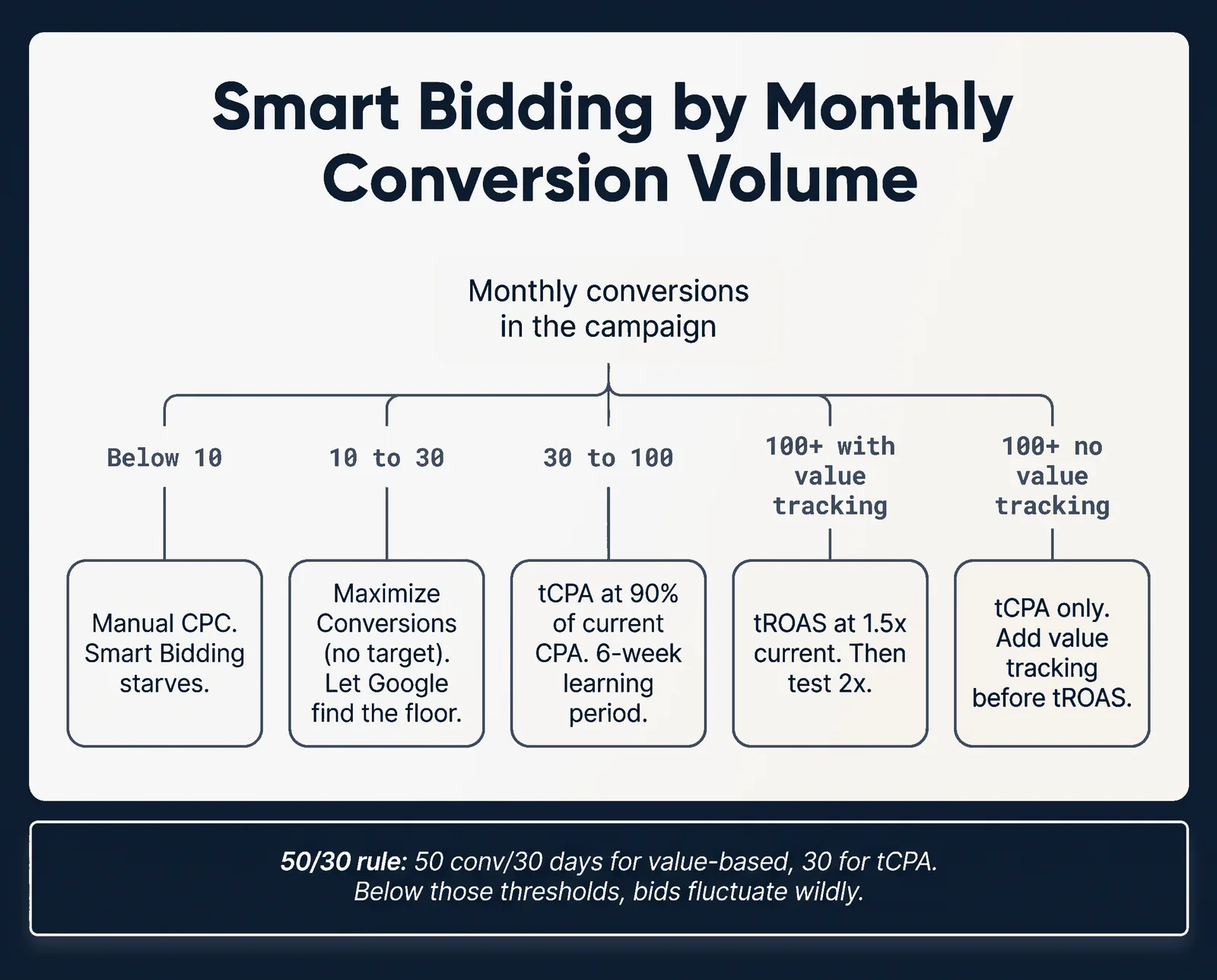
Decision tree by monthly conversions
Monthly conversions in the campaign
│
├── Below 10 → Manual CPC. Smart Bidding starves at this volume.
│
├── 10 to 30 → Maximize Conversions (no target). Let Google find the floor.
│
├── 30 to 100 → tCPA at 90% of current CPA. 6-week learning period.
│
├── 100+ with value tracking → tROAS at 1.5x current ROAS. Then test 2x.
│
└── 100+ without value tracking → tCPA only. Add value tracking before tROAS.
The 50/30 rule
Smart Bidding stabilizes at:
- 30 conversions in 30 days for tCPA
- 50 conversions in 30 days for value-based strategies (tROAS, Max Conversion Value)
Below those thresholds, bids will fluctuate wildly and CPA will spike. Stay on Manual CPC or Maximize Conversions until you cross the line.
When to switch back to Manual CPC
If you switched to tCPA and 6 weeks later:
- CPA is more than 1.5x the target you set, AND
- Volume has not increased,
revert to Manual CPC. Smart Bidding cannot save a campaign that does not have enough conversion data signal.
The smart bidding scaling rules
- Adjust target CPA or ROAS by no more than 20% at a time
- Wait 7 to 14 days between adjustments
- Budget changes above 20% reset learning. Stay below 20%.
Worked example, B2B SaaS demo campaign
- Current state: Manual CPC, $30 average CPC, 18 conv/mo, $80 cost per demo
- Decision: stay on Manual CPC (under 30 conv/mo)
- Action: increase non-brand keyword breadth, push to 35+ conv/mo
- Then switch to tCPA at $72 (90% of current $80 CPA)
- After 6 weeks at tCPA, evaluate: if CPA at $58, lower target to $52. If CPA at $95, revert to Manual CPC.
The rest of the Massive Impact library builds on patterns like this. See the full set at the Massive Impact resource library.
Part 7, LSA Tactical Guide (Post-October 2025 Overhaul)
LSA is the highest-ROI channel for most service businesses with category eligibility. After the October 20, 2025 overhaul, the rules changed.
The Google Verified migration
| Before October 20, 2025 | After October 20, 2025 |
|---|---|
| Google Guaranteed badge (home services) | Unified Google Verified blue checkmark |
| Google Screened badge (legal, financial, health) | Unified Google Verified blue checkmark |
| Reviews on LSA profile separately | Reviews flow through Google Business Profile only |
What changed for advertisers:
- Reviews on GBP now directly drive LSA rank
- Background check + license verification still required
- Linked, verified, complete GBP is mandatory (ads will not run without it)
- Service area accuracy still drives lead match quality
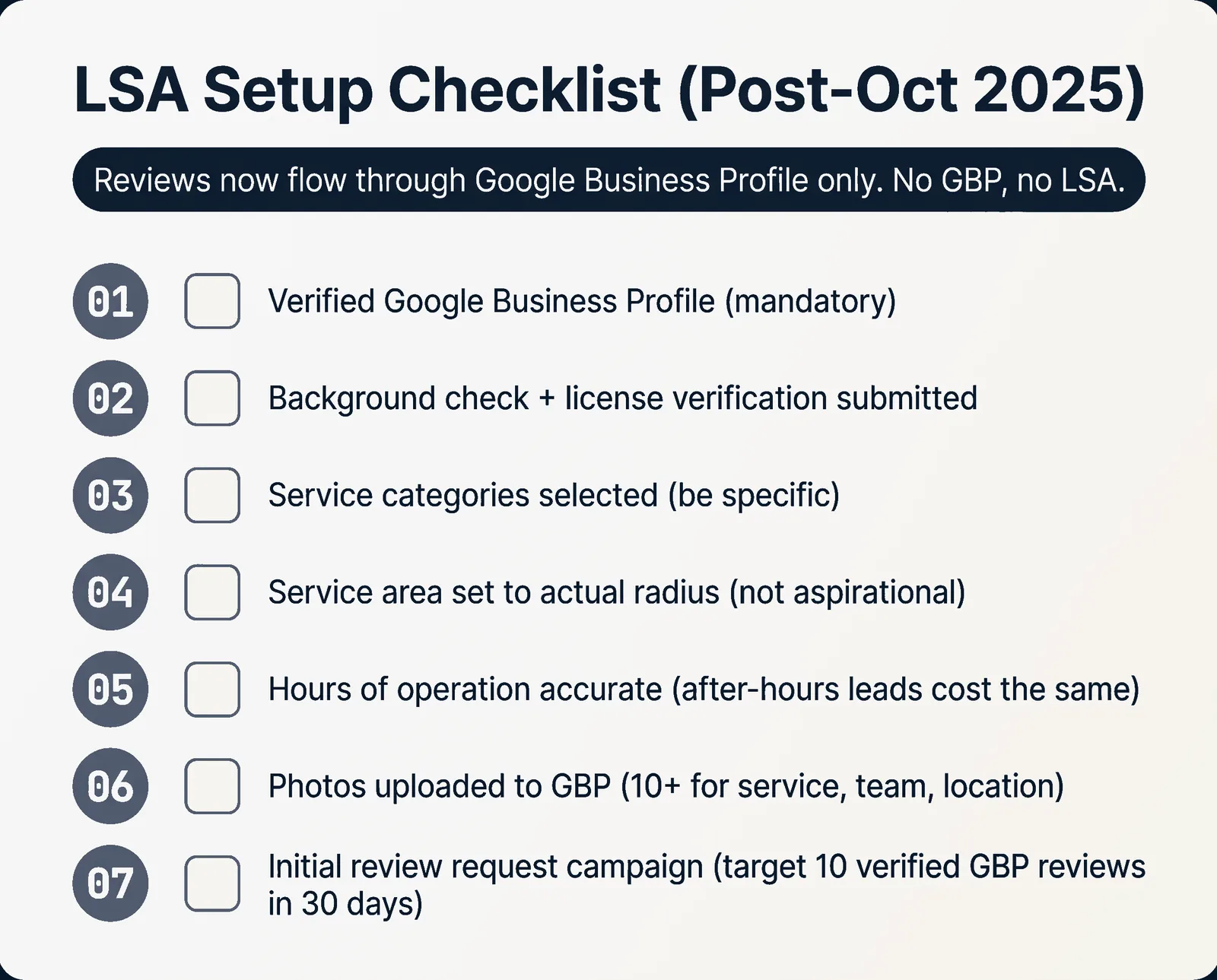
LSA setup checklist
- Verified Google Business Profile (mandatory, ads will not run without it)
- Background check + license verification submitted (5 to 10 business day turnaround)
- Service categories selected (be specific, broad selections dilute lead quality)
- Service area set to actual service radius (not aspirational)
- Hours of operation accurate (after-hours leads cost the same as business-hours leads if you cannot answer)
- Photos uploaded to GBP (10+ for service photos, team, location)
- Initial review request campaign set up (target 10 verified GBP reviews in first 30 days)
Daily LSA optimization
| Lever | Target |
|---|---|
| Lead response time | Under 5 minutes |
| Lead acceptance rate | Above 80% |
| GBP review velocity | 2 to 4 new reviews per month minimum |
| Dispute rate | Disputed leads must be filed within 30 days |
| Hours of operation | Match actual capacity |
LSA dispute process
If you receive an invalid lead (wrong service area, spam, robocall, asking for unsupported service), file a dispute within 30 days. Approved disputes are credited.
Common valid disputes:
- Lead is for a service you do not offer
- Lead is outside your service area
- Lead is spam or a robocall
- Lead is from a competitor or salesperson
- Lead requested information only, no service intent
Reverse-engineering LSA rank when stalled
If your LSA rank dropped or volume halved:
- Check GBP review velocity. If you stopped collecting reviews, rank drops.
- Check lead response time in the LSA dashboard. If it climbed above 5 minutes, rank drops.
- Check lead acceptance rate. If it fell below 80%, Google deprioritizes you.
- Check service hours vs actual answer time. If you accept leads outside hours and miss them, rank drops.
- Check budget pacing. If you are exhausting daily budget by noon, raise the daily budget or lower the lead price.
LSA category benchmarks 2026
| Category | Avg CPL | Avg ticket size |
|---|---|---|
| HVAC | $288 | $2,433 |
| Plumbing | $263 | $1,707 |
| Electrical | $245 | $1,150 |
| Roofing | $310 | $9,200 |
| Cleaning | $48 | $185 |
| Lawyer (PI) | $180 to $300 | varies (case value $5K to $50K+) |
| Lawyer (Family) | $90 to $200 | $3K to $15K retainer |
| Dentist | $55 to $90 | $400 average first visit |
| Financial advisor | $120 to $250 | varies |
LSA average across 760 businesses surveyed in 2026: $55 CPL.
This pattern is one piece of a wider toolkit. Adjacent playbooks at the Massive Impact resource library.
Part 8, Funnel Math, Compliance, Checklists, Failures
CAC budget formula
Maximum sustainable CAC = AOV x Gross Margin % x CAC allocation %
Worked examples
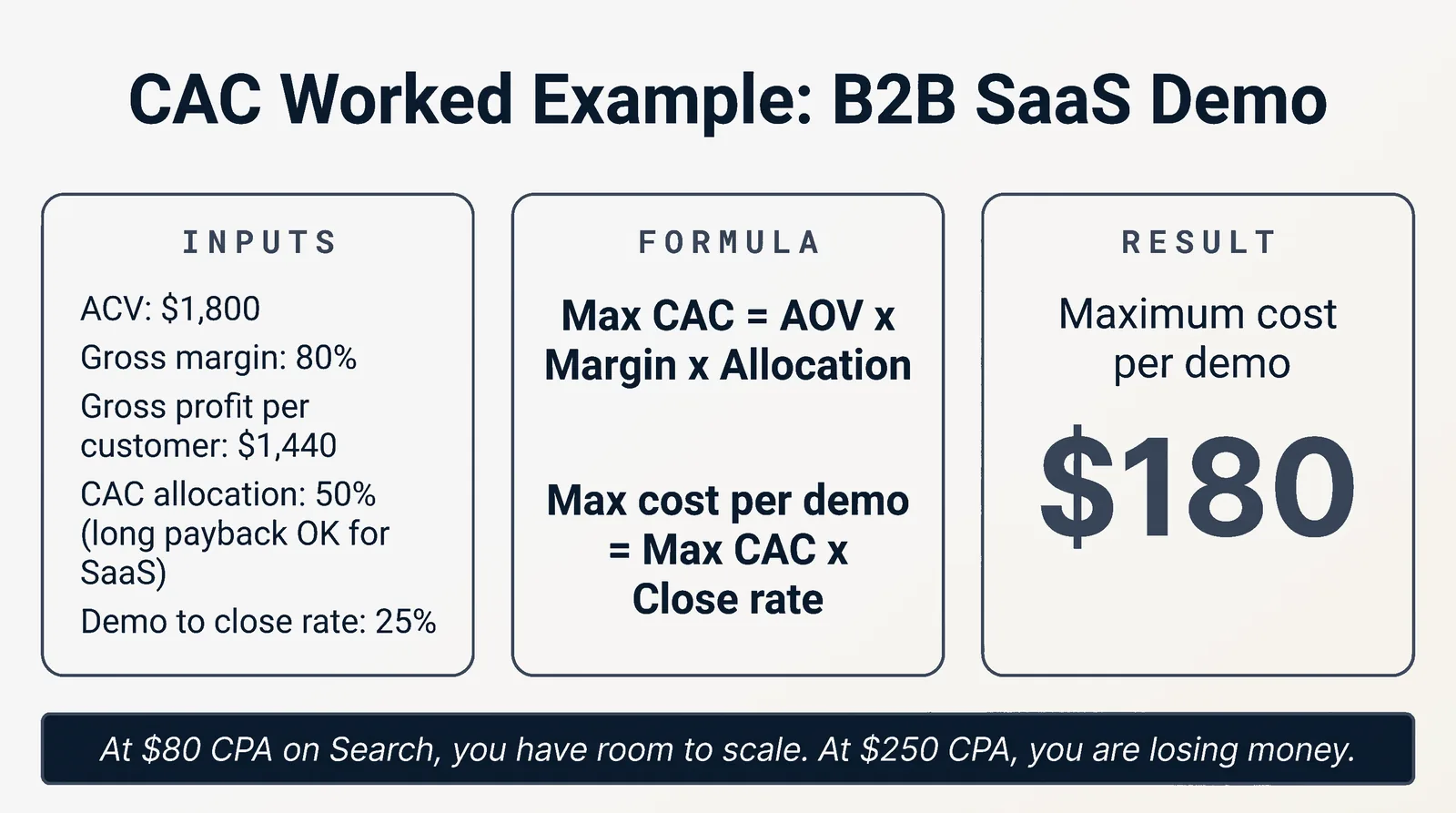
B2B SaaS demo campaign (Search):
- ACV: $1,800
- Gross margin: 80%
- Gross profit per customer: $1,440
- CAC allocation: 50% (long payback acceptable for SaaS)
- Maximum sustainable CAC: $720
- Demo to close rate: 25%
- Maximum cost per demo: $180
If your Search account is producing demos at $80 CPA, you have room to scale. If at $250, you are losing money.
HVAC LSA campaign:
- Average ticket: $2,433
- Gross margin: 35%
- Gross profit per job: $851
- CAC allocation: 25%
- Maximum sustainable CAC: $213
- LSA at $288 average CPL with 80% acceptance and 60% close = $600 cost per booked job
That is over budget. Either raise close rate (better intake), raise ticket (maintenance plan upsell), or lower CPL (better service area discipline).
Breakeven CPL by close rate
Maximum CPL = Maximum CAC x Close Rate
Lawyer (PI) example:
- Maximum CAC per signed case: $1,400
- Lead-to-signed close rate: 6%
- Maximum CPL: $84
If LSA leads cost $200 and close at 6%, real CAC is $3,333 and you are losing $1,933 per signed case.
LTV math for service businesses
Same as in P26 Meta Ads playbook. For dental:
- Average annual spend: $640
- Years retained: 7
- Patient LTV: $4,480
- CAC allocation against LTV: 12%
- Maximum sustainable CAC: $537
If first-visit CPA on Google is $200, you have room. If $600, you do not, unless you can raise retention or first-visit ticket.
Payback period for SaaS
CAC payback months = CAC / (Monthly ARR x Gross Margin %)
Healthy SMB SaaS payback in 2026 is 12 to 18 months. Above 24 months, a small operator runs out of cash before customers pay back.
HIPAA-safe Google Ads stack (medical, dental, mental health)
Google Ads is NOT HIPAA-compliant in 2026 and Google does not sign a BAA. This means:
- Do NOT upload patient PHI to Customer Match
- Do NOT fire conversion events that could associate a user with a specific condition (separate "Booked Appointment" from "Booked Anxiety Treatment Appointment")
- Server-side GTM with HIPAA-compliant middleware (with BAA) is the non-negotiable standard
- Avoid LSA for sensitive specialties (it signals patient intent back to Google)
- Use Google Analytics 4 with the IP anonymization toggle and a HIPAA-compliant data warehouse (BigQuery export with proper IAM, BAA-covered Snowflake, etc.) for downstream analysis
State bar copy fitness for lawyers
Same fitness tests as P26 Meta Ads playbook (ABA Rules 7.1 to 7.5). For Google specifically:
- Headline 30-character limit makes superlatives easy to violate ("BEST PI LAWYER") - avoid them
- Sitelink extensions can violate state bar rules if they imply specialization (use "Practice Area: Personal Injury" not "PI Specialist")
- California SB 37 (effective January 1, 2026) requires named attorney + CA bar number + real CA office address in ad copy or extensions when targeting California
Conversion tracking + Enhanced Conversions
The 2026 stack:
- Capture GCLID in middleware on every form submit; persist to CRM
- SHA-256 hash email/phone/address client-side before sending to Google
- Server-side GTM for medical/legal/financial verticals (mandatory for HIPAA, recommended for everyone else)
- Offline Conversion Imports via Google Ads API for downstream stages (MQL, SQL, Closed-Won)
- Upload offline conversions within 63 days of last click. Past that, Google will not import them.
GCLID + hashed user-provided data is the most durable attribution combo in 2026.
Launch day checklist
- Conversion actions defined and marked as primary (one primary per account)
- Enhanced Conversions enabled (single feature toggle in Conversions)
- GCLID parameter capture on all forms
- CRM import path tested with one synthetic conversion event
- 25 universal negatives applied account-wide
- Brand defense campaign live with phrase + exact match
- Non-brand campaign with 5 to 8 highest-intent keywords
- Geo-targeting set to actual service area, not aspirational
- Bid adjustments for mobile vs desktop based on funnel (mobile +0% to start, adjust after data)
- Spending limit set at weekly cap (prevents runaway charges)
Day 7 review
- Search terms report: review every triggered query, add irrelevant ones to negatives
- Quality Score check: anything below 5/10 needs ad copy or landing page work this week
- CTR by ad: identify which RSA combinations are surfacing, pause underperformers
- Top of impression share: if below 10%, raise bids or improve Quality Score
- Conversion volume on track for 30/mo target? If yes, plan tCPA test for week 5
Day 30 review
- Smart Bidding eligibility: did any campaign cross 30 conv/mo? Plan transition to tCPA
- Negative keyword expansion: pull all search terms from past 30 days, add anything irrelevant
- PMax asset group performance: refresh underperformers, replicate winners
- Geo performance: drop the bottom 20% of zip codes by CPA
- Time of day performance: schedule budget against best-performing hours
- Compare Google-reported CPA vs CRM-reported CPA. Use the larger as truth.
The 10 most common 2026 failures
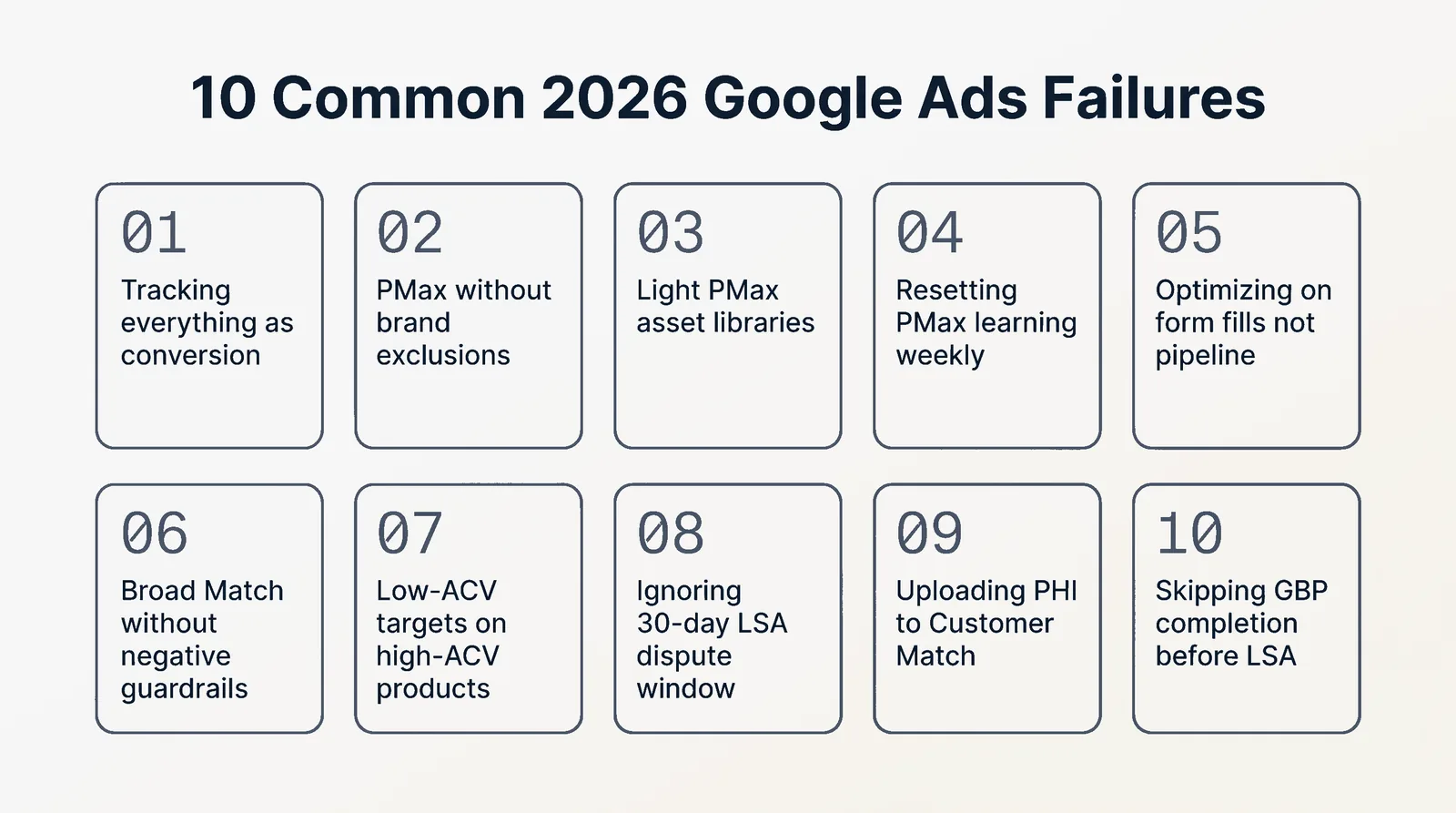
Tracking everything as a conversion. Pageviews and button clicks pollute Smart Bidding. Fix: track only meaningful events. One primary conversion per campaign objective.
Running PMax without brand exclusions. Cannibalizes Search at worse Quality Scores. Fix: brand exclusions on PMax always when you run a separate brand campaign.
Light PMax asset libraries. Five headlines and three images give the AI nothing to optimize. Fix: ship 15+ of every asset type before launch.
Resetting PMax learning with frequent changes or 20%+ budget shifts. Fix: set it, leave it, monitor weekly without editing for the first 6 weeks.
Optimizing on form fills, not pipeline. Without offline conversions piped from CRM, 57% of B2B SaaS spend is wasted on search terms that never convert. Fix: pipe SQL or Closed-Won back as the primary conversion event.
Broad Match without negative keyword guardrails. The fastest way to burn budget on "free" and "jobs" queries. Fix: 25 universal negatives at minimum, plus weekly search terms review.
Applying low-ACV targets to high-ACV products. A $5K cost per SQL is profitable on $100K ACV with 5:1 LTV:CAC. Fix: set tCPA against your actual unit economics, not against industry averages.
Ignoring LSA dispute windows. Disputed leads must be flagged within 30 days. Fix: weekly LSA lead review.
Uploading PHI to Customer Match in healthcare. Federal violation. Fix: server-side GTM with BAA, no PHI to Google ever.
Skipping GBP completion before launching LSA. Ads will not run, period. Fix: GBP completion checklist done before LSA submission.
What to read next
- The 2026 Meta Ads Playbook (P26) for the paid social counterpart to this Google playbook
- The 2026 TikTok Ads Playbook (P28) for the third leg of paid acquisition for SaaS, services, and local in 2026
- The Low-Ticket Funnel Playbook (P29) for the offer side of these ads, where ad creative plus tripwire plus OTO plus continuity make the math work
The full Massive Impact library lives at the Massive Impact resource library.
The rest of the guide is yours, free.
Enter your email to keep reading and get the PDF to keep.
No spam. One email unlocks every Massive Impact resource.
“One of our two Google campaigns actually had a 42-time ROA. So for everything we were putting in, it was multiplied by 42.”
The service behind this
More from the library
